


Twitter (now rebranded as X) remains a powerful platform for digital advertising, offering businesses unique opportunities to engage with audiences in real time. With over 500 million active users, X provides a space for brands to boost visibility, drive website traffic, and increase conversions through highly targeted advertising.
This guide, we’ll explore how Twitter advertising works, the types of ads available, costs, and the best strategies to maximize your ROI. Whether you’re a small business or an enterprise, leveraging Twitter Ads effectively can help you achieve your marketing goals.
What Is Twitter Advertising?
Twitter Advertising (X Ads) is a paid marketing solution that allows businesses to promote their content, products, or services directly within users’ timelines, search results, and trending topics. Through Twitter Ads, brands can:
-
Boost brand awareness by reaching a broader audience.
-
Drive traffic to websites, apps, or landing pages.
-
Engage with potential customers through promoted tweets and interactive campaigns.
-
Retarget past visitors and reach highly relevant audiences.
Twitter’s ad system is auction-based, meaning advertisers bid for ad placements, with costs depending on factors like audience targeting, engagement, and competition. The platform also utilizes AI-powered optimizations, helping advertisers maximize their ad performance.
With various ad formats—including promoted tweets, video ads, and interactive campaigns—Twitter provides flexible options to suit different business needs.
Are Twitter Ads Worth It?
When considering digital advertising, one question often arises: Are Twitter (X) ads worth the investment? The answer largely depends on your business goals, target audience, and advertising strategy.
Twitter (X) offers a highly engaging and real-time platform where brands can connect with audiences through interactive conversations. Unlike other social media platforms that rely heavily on visual storytelling, Twitter thrives on quick interactions, trending topics, and concise messaging, making it an ideal space for brands looking to boost engagement.
Why Consider Twitter Ads?
Here are a few key reasons why businesses invest in Twitter advertising:
-
High engagement rates: Twitter’s conversational nature means users actively engage with ads through likes, retweets, and replies.
-
Precise audience targeting: The platform allows advertisers to target users based on interests, behaviors, and even keywords in tweets.
-
Cost-effective options: Compared to platforms like Facebook or LinkedIn, Twitter ads often have lower CPC (cost-per-click) and CPM (cost per 1,000 impressions).
-
Flexibility in ad formats: Twitter offers a variety of ad formats that can be tailored to different marketing goals, from brand awareness to conversions.
Still, Twitter advertising isn’t for everyone. If your audience isn’t active on the platform or if you’re looking for long-form content marketing, you may need to supplement Twitter ads with other platforms.
Other Benefits of Twitter (X) Ads
In addition to brand visibility and engagement, Twitter ads come with several strategic advantages.
1. Demographic Targeting Options
Twitter enables advertisers to target audiences based on specific demographics, including:
-
Age, gender, and location: Reach users based on their profile data.
-
Interests and behaviors: Target users who frequently engage with specific topics.
-
Device targeting: Run campaigns tailored to mobile or desktop users.
This level of targeting ensures your ads reach the most relevant audience, increasing engagement and conversion rates.
2. Tailored Audiences
Twitter’s custom audience feature allows you to retarget users who have previously interacted with your brand. These include:
-
Website visitors who browsed specific pages.
-
Engaged users who have interacted with your tweets.
-
Lookalike audiences that resemble your existing customers.
This approach improves ad relevance and ROI, as you’re targeting users already familiar with your brand.
3. Cost-Effective Advertising
Compared to other platforms, Twitter offers competitive pricing models that fit various budgets. Some key cost benefits include:
-
Lower CPC and CPM: Twitter ads often cost less than LinkedIn or Facebook ads.
-
Flexible budget settings: Advertisers can set daily limits and control ad spend easily.
-
Bidding strategies: Options like automatic bidding help optimize ad spend.
4. AI-Powered Optimized Targeting
Twitter uses artificial intelligence (AI) and machine learning to enhance ad targeting and performance. Some AI-driven benefits include:
-
Predictive analytics to identify high-engagement audiences.
-
Automated bidding suggestions to maximize results.
-
Smart ad placements that ensure your ads are shown to the right people at the right time.
7 Types of Twitter Ads
Twitter offers various ad formats designed to meet different campaign objectives. Below, we’ll explore the seven primary types of Twitter ads and how they work.
1. Promoted Ads
Promoted Ads function similarly to regular tweets but appear in users’ timelines, search results, and profiles. These ads help increase visibility, engagement, and website traffic.
Best Use Cases:
-
Promoting blog posts, new products, or special offers.
-
Increasing website traffic and brand awareness.
-
Driving engagement through likes, retweets, and comments.
Pricing:
Promoted Ads operate on a cost-per-engagement (CPE) model, meaning you only pay when users click, like, retweet, or reply.
2. Vertical Video Ads
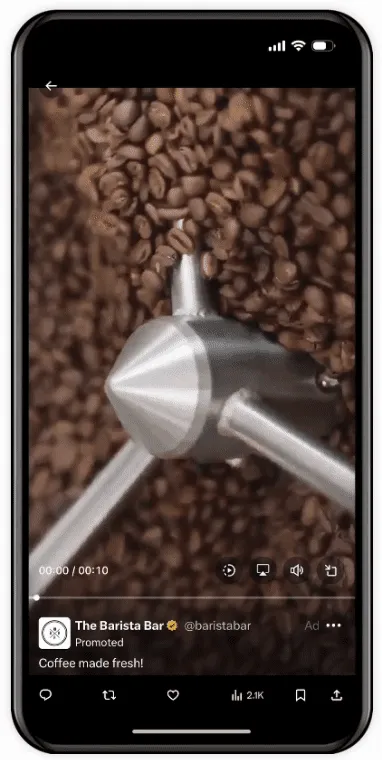
With the rise of short-form video content, Twitter offers Vertical Video Ads to drive higher engagement rates. These ads autoplay in users’ timelines and work well for storytelling.
Best Use Cases:
-
Showcasing product demos or behind-the-scenes content.
-
Running teaser campaigns for upcoming events or launches.
-
Engaging mobile-first audiences.
Pricing:
-
Billed based on video views (CPV – Cost Per View).
-
Advertisers can choose between skippable and non-skippable video ads.
3. X Amplify
X Amplify is Twitter’s premium video advertising feature, allowing brands to partner with top publishers, media companies, and influencers for expanded reach.
Best Use Cases:
-
Partnering with news outlets, sports networks, or entertainment brands.
-
Running co-branded content to enhance credibility.
Pricing:
Amplify runs on a CPM (Cost Per 1,000 Impressions) model, making it a great option for large-scale brand awareness campaigns.
4. X Takeovers

X Takeovers (formerly known as Twitter Trend Takeover) allow brands to dominate high-visibility areas like the Explore tab and trending section.
Best Use Cases:
-
Launching new products or services.
-
Running event-based campaigns.
-
Boosting awareness during peak shopping seasons.
Pricing:
X Takeovers are among Twitter’s most expensive ad formats, starting at $250,000 per day.
5. X Live
Twitter Live ads enable brands to stream live content, allowing real-time interaction with audiences.
Best Use Cases:
-
Hosting live Q&A sessions, product demos, or virtual events.
-
Engaging with audiences during live sports or entertainment broadcasts.
Pricing:
Live ads can be combined with sponsored content or promoted tweets for additional visibility.
6. Dynamic Product Ads (DPA)
DPAs allow brands to retarget users with product ads based on their browsing behavior, making them ideal for eCommerce businesses.
Best Use Cases:
-
Retargeting users who abandoned their carts.
-
Showcasing personalized product recommendations.
Pricing:
DPAs operate on a CPC (cost-per-click) or CPM model, depending on campaign goals.
7. Collection Ads
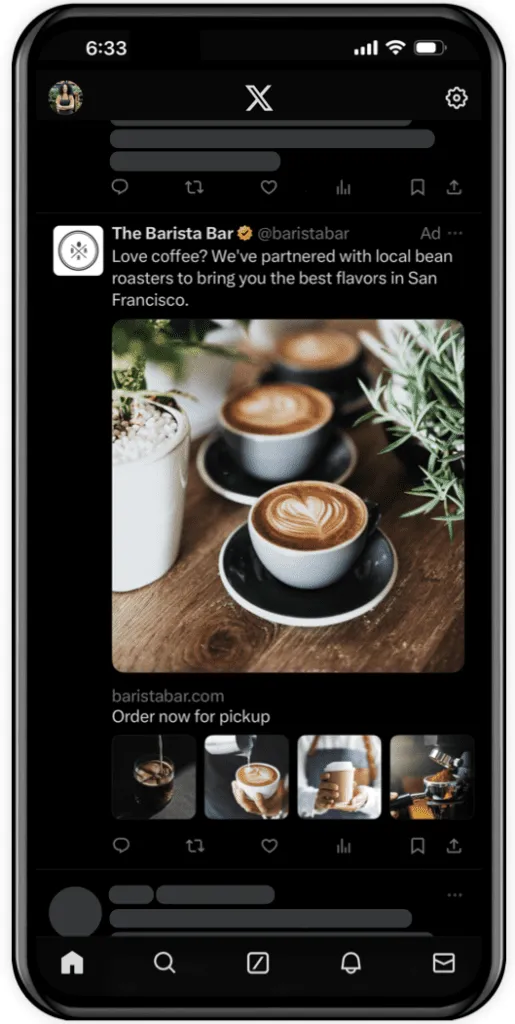
Collection Ads combine images, videos, and carousels to create an immersive ad experience.
Best Use Cases:
-
Showcasing product catalogs.
-
Running storytelling campaigns.
-
Engaging users with interactive content.
Pricing:
Collection Ads are billed based on engagement metrics, making them a flexible option for both brand awareness and conversion-focused campaigns.
Bonus: Additional X Features
In addition to the above ad formats, Twitter offers extra tools to enhance advertising performance:
-
Twitter Spaces Ads: Promote audio-based content through Twitter Spaces.
-
Conversational Ads: Encourage users to participate in polls or branded conversations.
-
Carousels & Multi-Destination Links: Direct users to multiple landing pages from a single ad.
How Much Do Twitter Ads Cost?
Twitter (X) advertising operates on a bid-based system, meaning that the cost of running ads depends on factors like competition, audience targeting, and ad type. Unlike traditional ad platforms with fixed pricing, Twitter allows advertisers to set their budgets and adjust spending based on campaign goals.
1. Monthly Advertising Costs
The monthly cost of Twitter ads varies depending on:
-
Business size and ad objectives: Small businesses might spend anywhere from $500 to $5,000 per month, while larger enterprises with aggressive marketing strategies may allocate $10,000 to $100,000+ monthly.
-
Industry competition: More competitive industries, such as finance, technology, and e-commerce, may have higher ad costs due to increased bidding.
-
Ad format selection: High-impact placements, such as X Takeovers, are significantly more expensive than basic Promoted Ads.
Here’s a rough estimate of Twitter ad costs based on different campaign types:
| Ad Type | Average Cost |
|---|---|
| Promoted Tweets | $0.50 – $2.00 per engagement |
| Video Ads (CPV) | $0.10 – $0.50 per view |
| Followers Campaigns | $2 – $4 per follower |
| App Install Campaigns | $1.95 – $3.25 per install |
| X Takeovers | $250,000+ per day |
2. Cost Per First Action (CPF)
Twitter’s Cost Per First Action (CPF) refers to the price advertisers pay when users take the initial action, such as clicking on an ad, liking a tweet, or retweeting content.
-
CPF varies based on audience size and engagement rate.
-
Campaigns that encourage high interaction (like polls or conversational ads) may result in lower CPF due to organic engagement.
-
Bidding strategy impacts CPF—manual bidding allows advertisers to set a maximum CPF, while automatic bidding optimizes costs based on competition.
Typical CPF Ranges:
-
Engagement Campaigns: $0.50 – $2 per first interaction
-
Video View Campaigns: $0.10 – $0.50 per first video view
-
Website Click Campaigns: $1 – $3 per first link click
3. Cost Per Follow (CPF)
Twitter’s Follower Campaigns are designed to help brands grow their audience. The Cost Per Follow (CPF) determines how much advertisers pay for each new follower acquired through a campaign.
-
CPF typically ranges from $2 to $4 per follower.
-
The cost is higher in competitive industries, such as finance, tech, or fashion.
-
Optimized targeting (e.g., using Custom Audiences or Lookalike Audiences) can reduce CPF.
Tips to Reduce CPF:
-
Target engaged users (those who have interacted with similar accounts).
-
Use strong visuals and CTAs to encourage follows.
-
Leverage trending topics to gain organic exposure and lower CPF.\
What Factors Affect Twitter Advertising Costs?
Several elements influence how much Twitter advertising costs, including ad quality, competition, and bidding strategy.
1. Quality Score
Twitter assigns a Quality Score to each ad campaign, affecting its visibility and pricing. A higher Quality Score leads to lower costs per engagement and better ad placements.
Factors affecting Quality Score include:
-
Engagement rate (likes, retweets, replies).
-
Relevance to the target audience (matching user interests).
-
Ad performance history (previous campaign success).
How to Improve Quality Score:
-
Use high-quality images and videos to boost engagement.
-
Write compelling ad copy with clear calls-to-action (CTAs).
-
Test multiple ad variations to find the best-performing content.
2. Competition
The more advertisers bidding for the same audience, the higher the costs.
-
Highly competitive industries (e.g., tech, finance) often experience higher CPCs.
-
Peak advertising seasons, like Black Friday or Christmas, see increased bids, driving up costs.
-
If competitors target the same keywords, your bid must be higher to win impressions.
How to Reduce Costs in Competitive Markets:
-
Narrow your audience with precise targeting (demographics, behaviors).
-
Test different time slots to avoid high-demand periods.
-
Use a mix of organic and paid strategies to improve reach.
3. Billable Actions
Unlike flat-rate advertising, Twitter charges based on the specific action users take (e.g., clicks, views, follows).
| Campaign Type | Billable Action |
|---|---|
| Engagement Campaign | Clicks, likes, retweets, replies |
| Video Views Campaign | First video view |
| App Install Campaign | Click leading to app store |
| Follower Campaign | New follower gained |
| Website Click Campaign | Link clicks |
-
Campaigns with multiple billable actions (e.g., engagement ads) may cost more.
-
Focusing on a single billable action (e.g., video views) can help control costs.
4. Bid Type
Twitter uses a bidding system where advertisers compete for ad placements. The bid type you choose impacts ad costs.
Types of Bidding on Twitter:
-
Automatic Bidding:
-
Twitter automatically adjusts your bid to maximize results within your budget.
-
Ideal for new advertisers who want Twitter to optimize ad costs.
-
-
Maximum Bidding:
-
Advertisers set the maximum amount they’re willing to pay per action.
-
Provides greater control over spending but requires manual adjustments.
-
-
Target Cost Bidding:
-
Advertisers set a desired cost-per-action (e.g., $1 per click).
-
Twitter adjusts bids to stay close to the target cost.
-
Which Bidding Strategy Should You Choose?
-
Automatic bidding works best for beginners.
-
Target cost bidding helps maintain predictable costs.
-
Manual bidding is ideal for advertisers with specific ROI goals.
Setting Twitter Budgets
To control ad costs effectively, businesses should set and adjust their Twitter advertising budget based on campaign goals.
1. Daily vs. Lifetime Budgets
Twitter allows advertisers to choose between:
-
Daily Budget: The maximum amount spent per day (e.g., $20/day).
-
Lifetime Budget: A total budget for the campaign’s entire duration (e.g., $500 for a 30-day campaign).
When to Use Each:
-
Use daily budgets for continuous campaigns that need regular optimization.
-
Use lifetime budgets for seasonal promotions or limited-time offers.
2. Budget Allocation by Campaign Type
Your budget distribution depends on your marketing objectives.
| Campaign Objective | Recommended Budget Split |
|---|---|
| Brand Awareness | 40% of the total budget |
| Website Traffic | 30% of the total budget |
| Lead Generation | 20% of the total budget |
| Retargeting Campaigns | 10% of the total budget |
3. Adjusting Budgets for Performance
Twitter provides real-time analytics that allow advertisers to track performance and optimize spending.
Optimization Strategies:
-
Increase spending on high-performing ads.
-
Lower bids for underperforming campaigns.
-
A/B test ad creatives to improve engagement and lower costs.
How to Post on Twitter: X Ad Targeting Options
To maximize the effectiveness of Twitter (X) advertising, advertisers need to choose the right targeting options. Twitter provides powerful audience segmentation tools, allowing businesses to reach specific users based on demographics, behavior, and interests.
1. Demographic Targeting
Demographic targeting allows advertisers to reach users based on age, gender, language, location, and device type.
-
Age & Gender: Twitter enables advertisers to set age brackets to ensure ads are only shown to relevant audiences.
-
Language: This option allows businesses to target users who speak a specific language (e.g., English, Spanish, French).
-
Location: Advertisers can refine their targeting by selecting countries, regions, cities, or even postal codes.
-
Device Type: Businesses can target mobile, tablet, or desktop users, ensuring ads reach audiences on the most effective platform.
Use Case Example:
A fitness brand launching a new app can target 18-35-year-old males and females in New York, Los Angeles, and Chicago, ensuring their ads reach their desired audience.
2. Keyword Targeting
Keyword targeting allows advertisers to target users based on the words and phrases they engage with on Twitter.
-
Search Keyword Targeting: Targets users who have searched for specific keywords.
-
Timeline Keyword Targeting: Displays ads to users based on recent tweets or interactions containing selected keywords.
Best Practices:
-
Use high-intent keywords relevant to your product (e.g., “best running shoes” for a sportswear brand).
-
Combine keyword targeting with demographic filters for precision.
-
Avoid overly broad keywords to minimize wasted ad spend.
Use Case Example:
A tech company launching a new smartphone can target users engaging with keywords like “best Android phone,” “new iPhone,” or “smartphone deals.”
3. Custom Audiences and Remarketing
Twitter allows advertisers to use Custom Audiences to retarget users who have previously interacted with their brand.
-
Website Retargeting: Targets users who have visited a website but did not convert.
-
Engagement-Based Retargeting: Reaches users who have interacted with previous tweets or ads.
-
Email/CRM Uploads: Allows advertisers to upload their customer database for retargeting.
Use Case Example:
A retail brand can retarget users who added products to their cart but didn’t complete the checkout process by showing them a discount offer.
4. Behavioral and Interest-Based Targeting
Twitter tracks user behavior and interests to help advertisers reach highly relevant audiences.
-
Behavioral Targeting: Uses data such as past purchases, browsing habits, and app usage.
-
Interest-Based Targeting: Targets users based on their topics of interest (e.g., sports, fashion, finance).
Use Case Example:
A sportswear brand can target users who regularly engage with sports content and follow fitness influencers on Twitter.
How to Advertise on Twitter: 9 Steps
Now that we’ve covered targeting options, let’s break down the process of launching a Twitter ad campaign in 10 easy steps.
Step 1: Create an X Ads Account
To start advertising on Twitter:
-
Visit ads.twitter.com and log in with your Twitter account.
-
Click “Start Campaign” to create your first ad.
-
Enter billing details (credit card or PayPal) to activate your account.
Step 2: Choose a Campaign Type
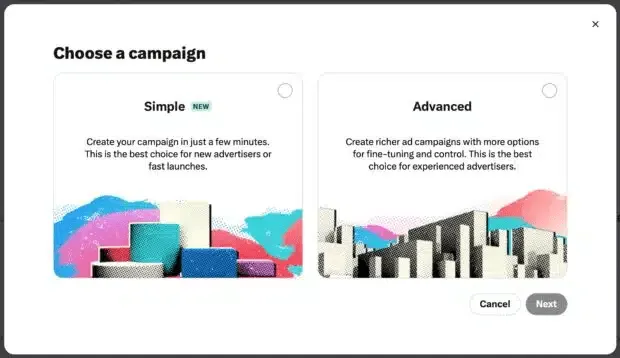
Twitter provides multiple campaign types, depending on your advertising goals.
| Campaign Type | Goal |
|---|---|
| Awareness Campaign | Reach as many users as possible. |
| Engagement Campaign | Increase likes, retweets, and replies. |
| Video View Campaign | Maximize video views. |
| Website Click Campaign | Drive traffic to a website. |
| App Install Campaign | Promote app downloads. |
| Lead Generation Campaign | Capture email signups. |
Pro Tip:
If you’re new to Twitter ads, start with an Engagement Campaign to increase brand awareness before launching conversion-focused campaigns.
Step 3: Set Campaign Objectives
Once you’ve selected a campaign type, you’ll need to define objectives:
-
Brand awareness: Maximize impressions.
-
Engagement: Encourage likes, retweets, and replies.
-
Website traffic: Drive clicks to a landing page.
-
App installs: Promote an app download.
Each objective determines which metrics Twitter will optimize for (e.g., engagement vs. conversions).
Step 4: Enter Campaign Details
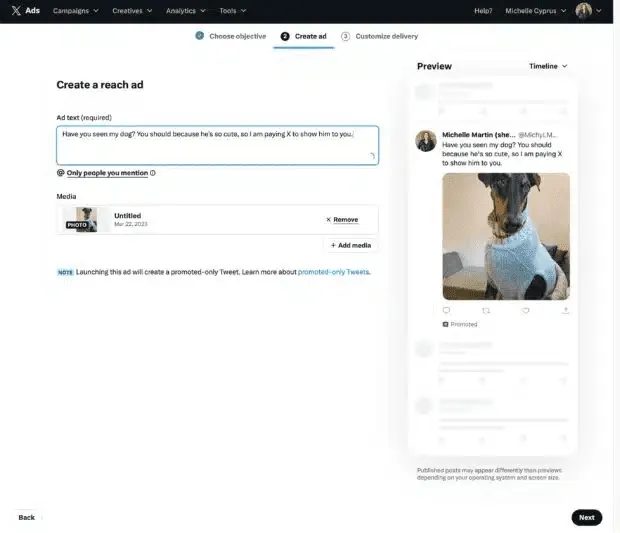
You’ll need to provide:
-
Campaign name (e.g., “Spring Sale Campaign”)
-
Start and end dates
-
Daily and lifetime budget
Budgeting Tip:
-
Start with a $20 daily budget and scale based on performance.
-
Use automatic bidding if you’re unsure about bid settings.
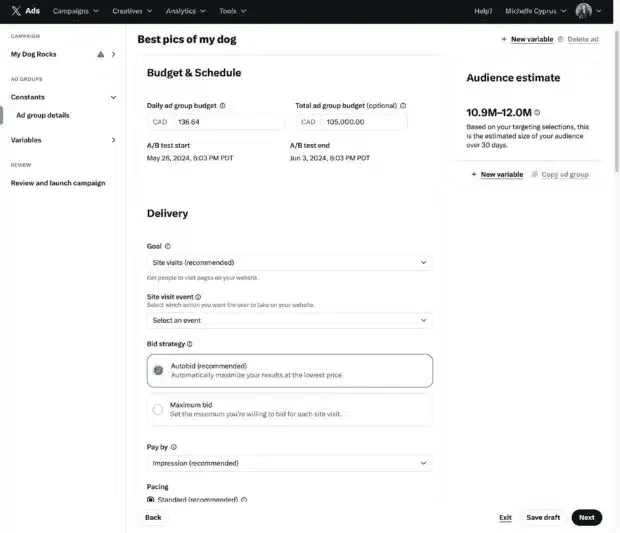
Step 5: Select Ad Group and Bidding
Twitter allows advertisers to create multiple ad groups within a campaign.
-
Each ad group can have different targeting criteria.
-
Set a maximum bid amount or allow Twitter to automatically adjust bids.
Pro Tip:
-
Higher bids increase impressions, but optimizing Quality Score can lower costs.
-
Use A/B testing to find the best-performing ad creatives.
Step 6: Identify Your Target Audience
At this stage, advertisers refine their target audience using:
✅ Demographic targeting (age, gender, location)
✅ Keyword targeting (tweets, searches)
✅ Custom audiences (email lists, website visitors)
✅ Interest and behavioral targeting
Targeting Tip:
-
Avoid broad targeting, as it increases ad costs.
-
Use Twitter Analytics to identify your audience’s behavior.
Step 7: Upload X Ad Creatives
Twitter supports multiple ad formats, including:
-
Single image ads (best for engagement).
-
Carousel ads (ideal for storytelling).
-
Video ads (effective for brand awareness).
-
X Live Ads (best for live events).
Best Practices for Ad Creatives:
-
Use bold visuals with minimal text.
-
Keep videos under 15 seconds for higher completion rates.
-
Include a clear call-to-action (e.g., “Shop Now,” “Sign Up”).
Step 8: Review Campaign Settings and Launch
Before launching:
✅ Double-check targeting settings
✅ Verify ad creative quality
✅ Ensure budget allocation is correct
Once everything looks good, click “Launch Campaign” 🚀.
Step 9: Monitor Campaign Performance
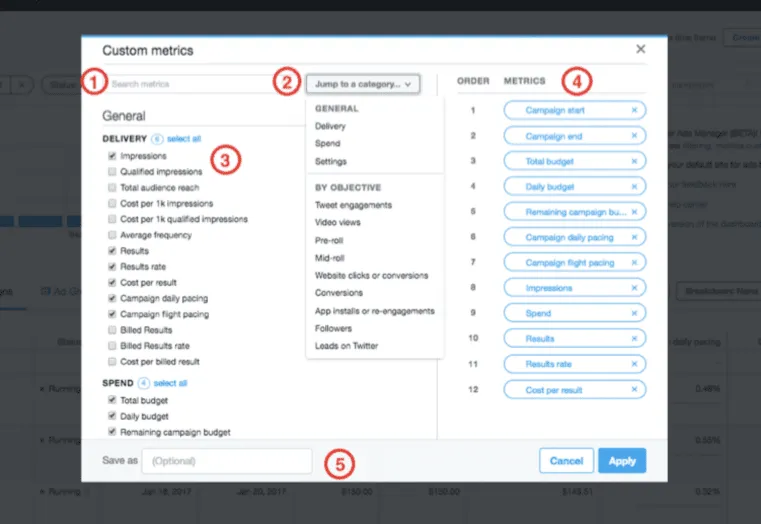
After launching, monitor performance in Twitter Ads Manager.
Key metrics to track:
-
CTR (Click-Through Rate): Measures engagement.
-
CPC (Cost Per Click): Determines ad efficiency.
-
Conversion Rate: Tracks goal completions.
Optimization Tips:
-
Pause underperforming ads to reduce wasted spend.
-
Adjust targeting based on engagement trends.
-
A/B test new creatives to improve conversion rates.
8 Twitter Advertising Tips and Best Practices: How To Post on Twitter the Right Way
To maximize the effectiveness of Twitter (X) ads, businesses need to craft engaging content, optimize ad settings, and continuously refine their strategy. Here are eight key best practices to help advertisers achieve higher engagement, conversions, and return on investment (ROI).
1. Keep Ad Copy Short and Sweet
Twitter’s fast-paced nature demands concise and compelling copy. Unlike other social platforms, where longer text can be effective, Twitter users prefer short, direct messages that quickly convey the ad’s value proposition.
✅ Use simple language to make ads more digestible.
✅ Limit text to 50-100 characters for maximum impact.
✅ Avoid unnecessary fluff—get straight to the point.
Example:
❌ Too Long: “Our brand-new smartphone is equipped with the latest AI-powered camera, a 5,000mAh battery, and a sleek, ultra-modern design. Order now!”
✅ Optimized: “Capture every moment with AI-powered precision 📸. Get the new XPhone today! 🚀 #SmartphoneRevolution”
2. Add a Strong CTA (Call to Action)
A clear, action-driven CTA tells users exactly what to do next after seeing your ad. Without it, engagement rates drop, and potential customers may scroll past without clicking.
✅ Use action-oriented words like “Shop Now,” “Sign Up,” or “Try for Free.”
✅ Create urgency (e.g., “Limited Time Offer”).
✅ Position the CTA at the end to reinforce the message.
Example CTA Phrases:
-
“Get 50% Off Today! 👉 Click to Claim.”
-
“Sign Up for Exclusive Early Access 🚀.”
-
“Start Your Free Trial Now 🔥.”
3. Create a Sense of Urgency
People are more likely to act when they feel a time constraint. By incorporating urgency in ad copy, advertisers can drive quicker decisions and increase conversions.
✅ Use time-sensitive phrases like “Limited Time,” “Hurry,” or “Offer Ends Soon.”
✅ Show stock availability (e.g., “Only 5 Left in Stock!”).
✅ Leverage FOMO (Fear of Missing Out) to encourage immediate action.
Example:
❌ Weak: “Our premium courses are now available.”
✅ Optimized: “Only 24 hours left! Enroll in our premium course now and get 30% off! 🎓🔥”
4. Limit Exit Points
Twitter ads should keep users focused on the action you want them to take. Having too many links or distractions can reduce conversions.
✅ Use a single, clear CTA per ad to avoid confusion.
✅ Minimize links that lead away from the primary objective.
✅ Ensure landing pages match ad messaging to create a seamless experience.
Example:
-
Good Ad Structure: Image + Short Copy + One CTA (e.g., “Click to Learn More”).
-
Bad Ad Structure: Multiple links in one ad, distracting users from the main CTA.
5. Add Compelling Visuals
Twitter users engage 3x more with image and video ads than text-only content. Eye-catching visuals increase attention and make ads more memorable.
✅ Use high-resolution images that align with your brand.
✅ Optimize video ads—shorter videos (6-15 seconds) perform best.
✅ Include text overlays to reinforce messaging.
Best Practices for Twitter Ad Visuals:
-
Use bright colors and bold contrasts.
-
Add human elements to evoke emotions.
-
Ensure text is readable on mobile screens.
Example Visual Guidelines:
| Format | Recommended Specs | Best For |
|---|---|---|
| Image Ads | 1200×1200 px | Engagement & Clicks |
| Video Ads | 1920×1080 px, under 15 sec | Brand Awareness |
| Carousel Ads | 1200×1200 px per image | Showcasing Products |
6. Start With Automatic Bidding
Twitter offers manual and automatic bidding options. If you’re new to Twitter advertising, automatic bidding is the best way to optimize ad delivery without overspending.
✅ Automatic bidding adjusts bids to maximize reach.
✅ It helps advertisers stay within their budget without manual tweaks.
✅ Once you gather data, switch to manual bidding for better control.
Pro Tip:
Start with a small daily budget ($10-$20) using automatic bidding. Once you analyze the campaign’s performance, gradually increase ad spend on high-performing ads.
7. Test Multiple Posts and Vary Creatives
Running one ad is not enough—to find what works best, test multiple versions of an ad with different copy, images, and CTAs.
✅ Create at least 3-5 ad variations per campaign.
✅ A/B test different headlines, images, and call-to-action buttons.
✅ Rotate creatives regularly to avoid ad fatigue.
Example of A/B Testing Ad Variations:
| Variation | Headline | CTA | Image Type |
|---|---|---|---|
| Ad A | “Boost Productivity Today!” | “Try for Free” | Infographic |
| Ad B | “Get More Done in Less Time!” | “Start Now” | Product Screenshot |
| Ad C | “Work Smarter, Not Harder!” | “Sign Up” | Lifestyle Photo |
8. Monitor and Adjust Campaigns
To ensure ongoing success, advertisers must track performance metrics and adjust their campaigns accordingly.
✅ Use Twitter Ads Manager to analyze key data points.
✅ Monitor click-through rates (CTR), conversion rates, and cost per action (CPA).
✅ Adjust audience targeting, bid strategy, or creatives based on performance.
Key Metrics to Track:
| Metric | What It Measures | Why It’s Important |
|---|---|---|
| CTR (Click-Through Rate) | % of people clicking the ad | Higher CTR = More engagement |
| Conversion Rate | % of users completing a goal | Determines ROI effectiveness |
| Cost Per Click (CPC) | Cost per user clicking the ad | Helps manage budget efficiency |
| Engagement Rate | Likes, retweets, and replies | Measures audience interest |
Optimization Tip:
If an ad is underperforming, try adjusting targeting settings, testing new creatives, or refining copy. Small tweaks can lead to big improvements in performance.
Twitter (X) Advertising FAQs
If you’re considering running ads on Twitter (X), you likely have questions about strategy, budget allocation, and requirements. Below are answers to some of the most commonly asked questions.
Can I Create My Own X Advertising Strategy?
Yes! You can create a custom Twitter advertising strategy based on your brand’s goals, audience, and budget. Here’s how:
-
Define Your Objectives:
-
Are you aiming for brand awareness, website traffic, app installs, or engagement?
-
-
Choose the Right Ad Type:
-
Twitter offers Promoted Ads, X Takeovers, Vertical Video Ads, and more—each suited to different goals.
-
-
Refine Audience Targeting:
-
Use demographic, behavioral, and interest-based targeting to reach the right users.
-
-
Set a Budget & Bidding Strategy:
-
Start with automatic bidding if you’re new to Twitter ads.
-
-
Create Engaging Ad Creatives:
-
Use high-quality visuals, compelling copy, and strong CTAs.
-
-
Launch and Monitor Performance:
-
Track click-through rate (CTR), conversion rate, and engagement metrics to optimize your campaign.
-
✅ Pro Tip: Start small, test multiple ad variations, and refine your strategy based on performance data.
What Percentage of Your Advertising Budget Should You Allocate to X Ads?
The amount you allocate to Twitter (X) advertising depends on your industry, goals, and overall digital ad budget. Here are some guidelines:
-
Small Businesses & Startups: 💰 10-20% of total ad spend for testing.
-
Mid-Sized Companies: 💰 20-40% if Twitter is a key audience platform.
-
Large Enterprises: 💰 40-60% for social media-heavy campaigns.
💡 Recommended Strategy: Start with $500-$1,000 per month, analyze results, and scale up based on ROI.
Do I Need to Be Verified to Post X Ads?
🔹 Yes, as of 2023, Twitter (X) requires advertisers to be verified.
-
Blue Check (Twitter Premium): Personal accounts must subscribe to Twitter Blue (X Premium) to run ads.
-
Gold or Gray Checkmarks: Businesses or government entities need Twitter’s verification for organizations.
Why?
-
Prevents spam and misuse of ads.
-
Ensures advertisers are legitimate.
✅ How to Get Verified:
-
Subscribe to Twitter Blue or apply for verification.
-
Ensure your profile is complete with a profile picture, bio, and website link.
-
Follow Twitter’s ad guidelines and policies.
How Can I Apply for Ads Pre-Authorization?
To run ads on X, advertisers must get pre-authorized, especially for certain industries (e.g., finance, healthcare, politics).
Steps to Apply for X Ads Pre-Authorization:
-
Go to Twitter Ads Manager: Log into ads.twitter.com.
-
Submit Your Business Information: Twitter may ask for tax ID, website, and contact details.
-
Agree to Twitter’s Ad Policies: Ensure your business complies with advertising restrictions.
-
Complete the Verification Process:
-
Subscribe to Twitter Blue or Business Verification.
-
-
Wait for Approval:
-
Approval time varies (typically 24-72 hours).
-
-
Start Running Ads! 🎯
💡 Pro Tip: If your ad category is restricted (e.g., political, crypto, healthcare), additional steps may be required. Check Twitter’s official ad policies before applying.
Maximize Your X Ad Success with Pro Real Tech
Twitter (X) advertising provides businesses with powerful tools to grow their brand, engage the right audience, and drive meaningful results. With advanced targeting, dynamic ad formats, and real-time analytics, X Ads can be a game-changer for businesses looking to scale.
To make the most of these benefits, you need a trusted Twitter advertising agency that understands the platform’s evolving strategies.
At Pro Real Tech, we’ve helped countless brands navigate Twitter’s evolution into X, adapting ad strategies for maximum ROI. Our expertise ensures your campaigns stay ahead of the competition.
💡 “Pro Real Tech combines agility and strategic expertise to deliver high-performing digital marketing solutions tailored to real business challenges.”
Our Full-Service Social Media Marketing Solutions:
✔ Social Media Management
✔ Brand & Franchise Social Media Marketing
✔ Enterprise Social Media Growth Strategies
✔ Search Engine Optimization (SEO)
✔ Compelling Ad Copy & Creative Development
✔ Data-Driven Reporting & Performance Analytics
🚀 Boost your X ad revenue and accelerate brand growth! Contact our social media experts today.


