


Secondary Keywords are extra search terms that support your main keyword. They are closely related to your topic and help search engines understand what your page is really about. While your primary keyword targets the main search intent, Secondary Keywords add context, depth, and relevance.
For example, if your main keyword is “email marketing,” Secondary Keywords might include “email subject lines,” “email automation,” “newsletter strategy,” or “email open rates.” Each phrase connects to the same topic but covers a different angle. This helps you rank for more searches without stuffing the same keyword into every sentence.
Search engines like Google now look at meaning, not just exact-match phrases. Because of that, Secondary Keywords can improve topical relevance and make your content more useful for readers. They also help match related questions, long-tail searches, and variations in the way people search.
- Primary keyword: the main term you want the page to rank for
- Secondary Keywords: related phrases that support the main term
- Search intent: the reason behind the search, such as learning, comparing, or buying
A strong page uses Secondary Keywords naturally in the copy, headings, image alt text, and meta elements when relevant. The goal is not to force them in. Instead, you should use them where they make sense and where they improve the topic. Tools like Google Trends and Google Search Console can help you find useful keyword variations.
Secondary Keywords are extra search terms that support your main target keyword. They help search engines understand your page topic in more detail. For example, if your main keyword is about SEO, Secondary Keywords might include related phrases, questions, or close variants users also search for. These terms do not replace your primary keyword. Instead, they add context, improve relevance, and help your content rank for more searches. Google explains this idea through search intent and helpful content signals.
Secondary Keywords strengthen your primary keyword by adding context, detail, and search intent. They help search engines understand what your page covers, so it can rank for more related searches. For example, a page targeting one main term can also include Secondary Keywords like close variants, questions, and supporting phrases users type into Google.
This improves topical relevance and can increase visibility across a wider set of queries. It also makes your content sound more natural for readers.
Secondary Keywords vs Other Keyword Types
Secondary Keywords support your main keyword, but they are not the same as keyword variations, long-tail keywords, or related topics. Knowing the difference helps you build content that is clear, useful, and easier for search engines to understand.
Primary vs Secondary
Your primary keyword is the main term you want the page to rank for. Secondary Keywords are closely connected terms that add context and depth. They help search engines see what your page covers beyond the main phrase.
For example, if your main keyword is “secondary keywords,” helpful secondary terms might include “LSI keywords,” “keyword clusters,” “search intent,” and “on-page SEO.” These terms support the topic, but they do not replace the main keyword.
Secondary Keywords vs Long-Tail Keywords
Long-tail keywords are usually longer and more specific search queries. Some long-tail terms can be Secondary Keywords, but not all of them are. The key difference is purpose. Long-tail keywords target narrow searches, while secondary terms expand and support the main page topic.
If you want a clear overview of keyword types, Google’s SEO Starter Guide is a useful place to start.
Related Keywords and Synonyms
Related keywords are terms connected to the same topic. Synonyms are words with similar meanings. Secondary Keywords can include both, but they go one step further. They should match the page intent and help answer more of the user’s question.
- Synonyms: Different words with similar meaning
- Related keywords: Terms linked to the topic
- Secondary Keywords: Supporting terms chosen to improve topical relevance
Why the Difference Matters
Using every keyword type in the same way can make content feel forced. A better approach is to give each one a role. Use the primary keyword for the main focus. Add Secondary Keywords in subheads, body text, image alt text, and meta elements where they fit naturally.
This method can improve topical coverage, help match more search queries, and keep your writing easy to read. For more guidance on search intent and useful content.
Primary Keyword vs Secondary Keywords
Primary keywords are the main search terms a page targets. They tell search engines the core topic of the content. Secondary Keywords are closely related terms, variations, and supporting phrases that add context.
For example, if your primary keyword is “running shoes,” Secondary Keywords might include “best running shoes for beginners,” “trail running shoes,” or “shoe cushioning.” These terms help you rank for more searches without changing the page’s main focus.
In short, the primary keyword leads the page, while Secondary Keywords strengthen relevance and improve topical depth.
Secondary Keywords vs Related Keywords
Secondary Keywords support your main keyword, while related keywords are simply terms connected by topic or search intent. In practice, secondary keywords are chosen on purpose to help a page rank for extra queries. Related keywords may be useful, but they are not always strategic. For example, Google’s guide on SEO basics shows why relevance matters. Put simply, all Secondary Keywords can be related, but not all related keywords are true Secondary Keywords.
Secondary Keywords vs Long-Tail Keywords
Secondary Keywords support your main term by covering close variations, related ideas, and search intent. Long-tail keywords are usually longer, more specific phrases, such as detailed questions or niche searches. In short, some long-tail terms can be Secondary Keywords, but not all Secondary Keywords are long-tail. The key difference is purpose. Secondary Keywords broaden topical relevance, while long-tail keywords often target narrower intent and lower competition.
Secondary Keywords vs Semantic Keywords and Entities
Secondary Keywords are related terms you add to support your main keyword. Semantic keywords are words and phrases that share meaning or context. Entities are specific people, places, brands, or things that search engines recognize, as explained by Google Search Central.
In short, Secondary Keywords help widen your reach, while semantic keywords and entities help search engines understand topic depth. A strong page often uses all three. That mix improves relevance, covers more search intent, and can help your content rank for a wider set of related searches.
Why Secondary Keywords Matter for SEO

Secondary Keywords matter because they help search engines understand the full meaning of your page. A single focus keyword can show the main topic, but it often does not cover every question, variation, or user intent tied to that topic. When you add closely related terms, your content becomes clearer, more complete, and more useful.
Google now looks beyond exact-match phrases. It tries to understand context, related ideas, and the words people use at different stages of a search. That means Secondary Keywords can help your page rank for more queries, not just one target term. In many cases, they also improve topical relevance, which can support stronger visibility over time.
How Secondary Keywords improve SEO
- Broader reach: Secondary Keywords help your page appear for related searches, question-based terms, and longer phrases.
- Better relevance: They give search engines more signals about your topic, which can make your content easier to classify.
- Stronger user experience: Readers find answers to more than one question on a single page, so they are less likely to bounce.
- Support for semantic search: Search engines connect related words and concepts, not just exact matches.
Another key benefit is content depth. Pages that only repeat one keyword can feel thin or forced. On the other hand, pages that use Secondary Keywords naturally often cover subtopics, examples, and common concerns. This makes the content more helpful for readers and more competitive in search.
Used well, Secondary Keywords also reduce the risk of keyword stuffing. Instead of repeating the same phrase again and again, you can vary your language while staying on-topic. That creates copy that reads better, answers more search intents, and has a better chance of ranking in 2026.
Improve Topical Relevance and Context
Secondary Keywords help search engines understand your page beyond the main term. They add related phrases, subtopics, and natural language that match what users also want to know. As a result, your content feels more complete and relevant to the topic. This can improve rankings for a wider set of searches, not just one exact keyword. For best results, place Secondary Keywords in body copy, image alt text, and useful sections that support search intent.
Capture More Variations of Search Intent
Secondary Keywords help you reach people who search in slightly different ways. One user may type “best running shoes for flat feet,” while another searches “supportive sneakers for flat feet.” By adding close variations, your page can match more searches without stuffing the same phrase again and again.
This also helps search engines understand your topic better. As a result, you can rank for broader intent, including informational, comparison, and long-tail searches.
Increase Visibility for More Queries Without Stuffing
Secondary Keywords help your page show up for more search terms without repeating the same phrase too often. Instead of stuffing one keyword into every line, add close variations, related questions, and supporting terms that match search intent. This makes your copy sound natural and easier to read. It also helps search engines understand the full topic.
Support Modern Search Features and AI Overviews
Secondary Keywords help your page match how people search with voice, image, and AI tools. Search engines use them to understand context, intent, and related topics. That makes your content more likely to appear in featured snippets, People Also Ask, and AI Overviews.
Use close variants, question phrases, and supporting terms in a natural way. Add clear definitions, short answers, and structured formatting so systems can pull key facts fast.
How Search Intent Shapes Secondary Keywords

Search intent is the reason behind a search. It tells you what a person wants to do next. That matters because Secondary Keywords should match that goal, not just repeat similar words. If intent is off, your page may rank for the wrong terms and fail to convert.
Most searches fall into a few simple groups: informational, navigational, commercial, and transactional. An informational query needs answers, guides, and definitions. A commercial query needs comparisons, reviews, and features. Transactional intent often needs pricing, product pages, or a clear next step. Your Secondary Keywords should support the main topic while fitting the right stage of the journey.
- Informational: “what are secondary keywords,” “secondary keywords examples,” “how to find secondary keywords”
- Commercial: “best keyword research tools,” “SEO keyword clustering tools”
- Transactional: “buy SEO tool,” “keyword research software pricing”
A smart way to choose Secondary Keywords is to study the current search results. Look at the top-ranking pages, the “People also ask” box, and related searches.
Finally, map each keyword to a page section. Use one set of Secondary Keywords in definitions, another in examples, and another in tool or strategy sections. This improves relevance, covers more questions, and helps your content satisfy both users and search engines.
Match Informational, Commercial, and Transactional Intent
Align Secondary Keywords with the reason behind the search. Informational terms answer questions, commercial terms compare options, and transactional terms show buying intent. When your page mixes these naturally, it can rank for more relevant searches without feeling forced.
- Informational: “what are secondary keywords”
- Commercial: “best tools for secondary keyword research”
- Transactional: “buy keyword research software”
Read the SERP Before Choosing Secondary Keywords
Before you pick Secondary Keywords, study the search results for your main term. Google shows what users really want, so check the top pages, titles, and featured snippets. Look for repeated phrases, common questions, and related topics that appear across the SERP. Those patterns help you choose Secondary Keywords that match search intent instead of guessing.
You can also review Google’s search results features.
Avoid Mixing Conflicting Intent in One Page
Keep each page focused on one clear goal. If your main term targets buying intent, do not add Secondary Keywords that signal research or comparisons. Search engines may struggle to understand the page, and users may bounce. Instead, group Secondary Keywords by matching intent, then build separate pages when needed.
How to Find Secondary Keywords

Finding Secondary Keywords is easier when you start with your main topic and then expand into related search terms. The goal is not to stuff a page with extra phrases. Instead, you want to find words and questions that support your primary keyword, match search intent, and help search engines understand your content better.
A good process starts with one main keyword. From there, look for related phrases, close variations, common questions, and topic-specific terms your audience also uses. Strong Secondary Keywords often appear in search results, keyword tools, forums, and competitor pages.
Start With Google Search
Google gives you free clues about what people search for. Type your main keyword into Google and review the autocomplete suggestions. Then check the “People also ask” box and the related searches at the bottom of the page. These areas often reveal useful Secondary Keywords and question-based phrases.
- Autocomplete suggestions
- People also ask questions
- Related searches
- Bolded terms in top-ranking results
Use Keyword Research Tools
Keyword tools help you find more Secondary Keywords faster. They show search volume, related phrases, and ranking difficulty. This helps you choose terms that fit your page without guessing.
Popular options include Google Keyword Planner, Ahrefs Keyword Generator. Trends is especially useful because it shows whether a topic is growing, stable, or fading.
When using a tool, look for:
- Close keyword variations
- Long-tail phrases
- Question keywords
- Terms with matching search intent
- Words that appear often across related results
Study Top-Ranking Pages
Another smart method is to analyze the pages already ranking for your target term. Open the top results and look for repeated words in their titles, subheadings, body copy, FAQs, and image alt text. If several high-ranking pages mention the same topics, those are likely strong Secondary Keywords or closely related concepts.
This is where many articles fall short. They copy keywords but ignore content gaps. You can do better by looking for missing angles, outdated examples, weak definitions, or unanswered questions. Then use those insights to build a more complete page.
Check Your Audience Language
Your audience may not use the same words as SEO tools. Visit forums, Reddit threads, YouTube comments, product reviews, and sites like Quora to see how real people talk about the topic. Their exact wording can uncover valuable Secondary Keywords you might miss in a standard tool.
Pay attention to repeated problems, beginner questions, and comparison phrases. These often make excellent additions to subheadings, FAQ sections, and supporting paragraphs.
Choose Keywords That Fit the Page
Not every related phrase belongs on the same page. Pick Secondary Keywords that support your main topic and match the purpose of the article. If a keyword needs a full answer on its own, it may deserve a separate page instead.
A simple rule helps here: if the term adds context, depth, or clarity, keep it. If it changes the topic too much, save it for another post. That way, your page stays focused, useful, and easier to rank.
Start With the Primary Keyword and SERP Analysis
Begin with your primary keyword, then study the search results for it. Look at the top-ranking pages, their titles, headings, and repeated phrases. Those patterns reveal user intent and help you spot strong Secondary Keywords that support the main topic.
- Check related searches and Google autocomplete.
- Review People Also Ask questions.
- Note common terms, variants, and subtopics competitors cover.
This step helps you choose Secondary Keywords that match what users want, not just what a tool suggests.
Use Keyword Research Tools to Find Variants and Questions
Start with tools that show real search language, not guesses. Platforms like Keyword Planner, and AnswerThePublic can uncover Secondary Keywords, question-based searches, and close variants.
- Look for related terms with clear search intent.
- Check “People also ask” and autocomplete results.
- Group similar phrases into one topic cluster.
This helps you choose Secondary Keywords that match what users want. As a result, your page can rank for more terms without stuffing the same phrase again and again.
Mine Competitor Pages for Missing Secondary Keywords
Review the top-ranking pages for your main term and note the related phrases they use often. These can reveal Secondary Keywords your page is missing. Check headings, FAQs, image alt text, and anchor text, not just body copy. Tools like Ahrefs or Google Trends can help spot patterns fast.
- Compare repeated terms across several pages
- Add only relevant Secondary Keywords
- Look for intent gaps, such as beginner, pricing, or examples
This helps you build fuller, more useful content without keyword stuffing.
Pull Terms From Google Search Console and Site Search
Start with Google Search Console. Open the Performance report and look for queries that already bring impressions or clicks. Those terms often reveal strong Secondary Keywords you can add to headings, FAQs, and body copy.
Next, check your site search data in tools like your CMS, GA4, or search plugin reports. Visitors often type exact phrases they expect to find. Those searches can uncover intent-rich Secondary Keywords your current pages miss. Use both sources together to find real language from real users.
Use People Also Ask, Autocomplete, and Related Searches
Google gives you fast clues for Secondary Keywords. Start with Autocomplete to spot real phrases people type. Next, check People Also Ask for common questions and intent. Then scroll to Related Searches for close topic ideas and long-tail terms.
- Find question-based Secondary Keywords.
- Spot buying, learning, or comparison intent.
- Add strong terms naturally to headings, body copy, and FAQs.
Filter Secondary Keywords by Relevance, Intent, and Difficulty
Next, narrow your Secondary Keywords list with three filters: relevance, intent, and difficulty. Pick terms that closely match your topic and support your main keyword. Then check search intent. Some Secondary Keywords fit informational pages, while others work better for product or service pages. Finally, review keyword difficulty and favor terms you can rank for now.
- Relevance: Does the term match the page?
- Intent: Does it fit what the searcher wants?
- Difficulty: Can your site compete?
How Many Secondary Keywords Should You Use?
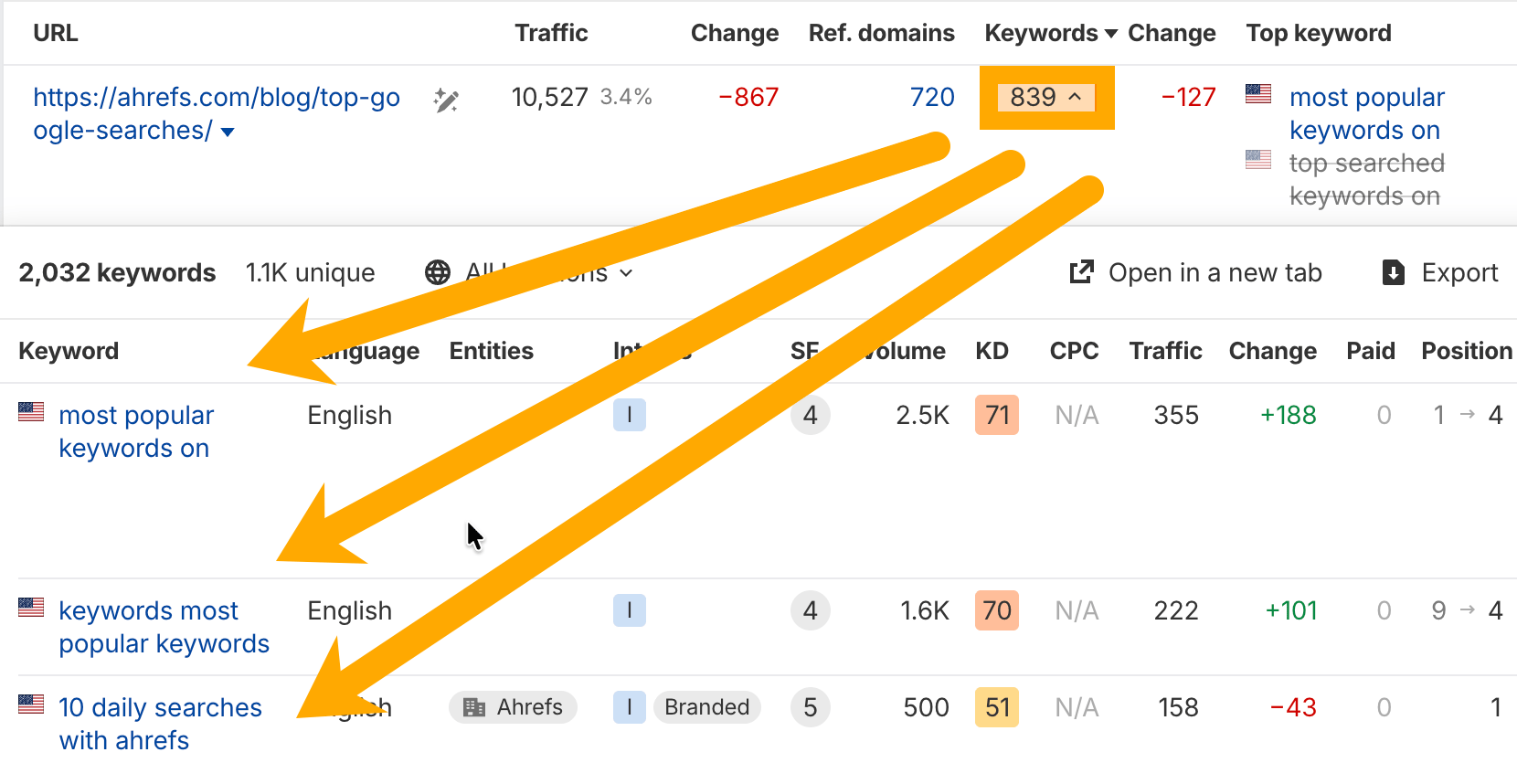
There is no perfect number of Secondary Keywords for every page. The right amount depends on the topic, the search intent, and the length of your content. In most cases, using 3 to 8 Secondary Keywords is a smart range for a standard blog post.
A shorter article may only need a few closely related terms. A longer guide can support more, as long as each one fits the topic naturally. The goal is not to stuff in every variation. Instead, choose Secondary Keywords that help search engines understand your page and help readers find complete answers.
- Use 2 to 3 for short posts under 1,000 words.
- Use 4 to 6 for average posts between 1,000 and 2,000 words.
- Use 6 to 8 for in-depth guides with several sections.
Each keyword should appear where it makes sense, such as in body copy, image alt text, and a subheading if relevant.
If your copy starts to sound repetitive, you are probably using too many Secondary Keywords. Relevance matters more than volume.
There Is No Fixed Number
There is no perfect number of Secondary Keywords for one page. The right amount depends on your topic, search intent, and word count. A short product page may only need two or three. In contrast, a long guide can support several more if they fit naturally.
Focus on relevance, not volume. Each term should help search engines understand the page better without making the copy feel forced. If your Secondary Keywords read smoothly, you are likely on the right track.
Choose Only What the Topic Can Naturally Support
Pick Secondary Keywords that fit the page’s main idea, not every term with search volume. A useful rule is simple: if the topic would feel forced to a real reader, leave it out. Search engines now reward clear topical focus more than keyword stuffing. Instead, choose close variants, related questions, and support terms that add context and help users. Strong Secondary Keywords should make the page richer, clearer, and more relevant.
Where to Use Secondary Keywords
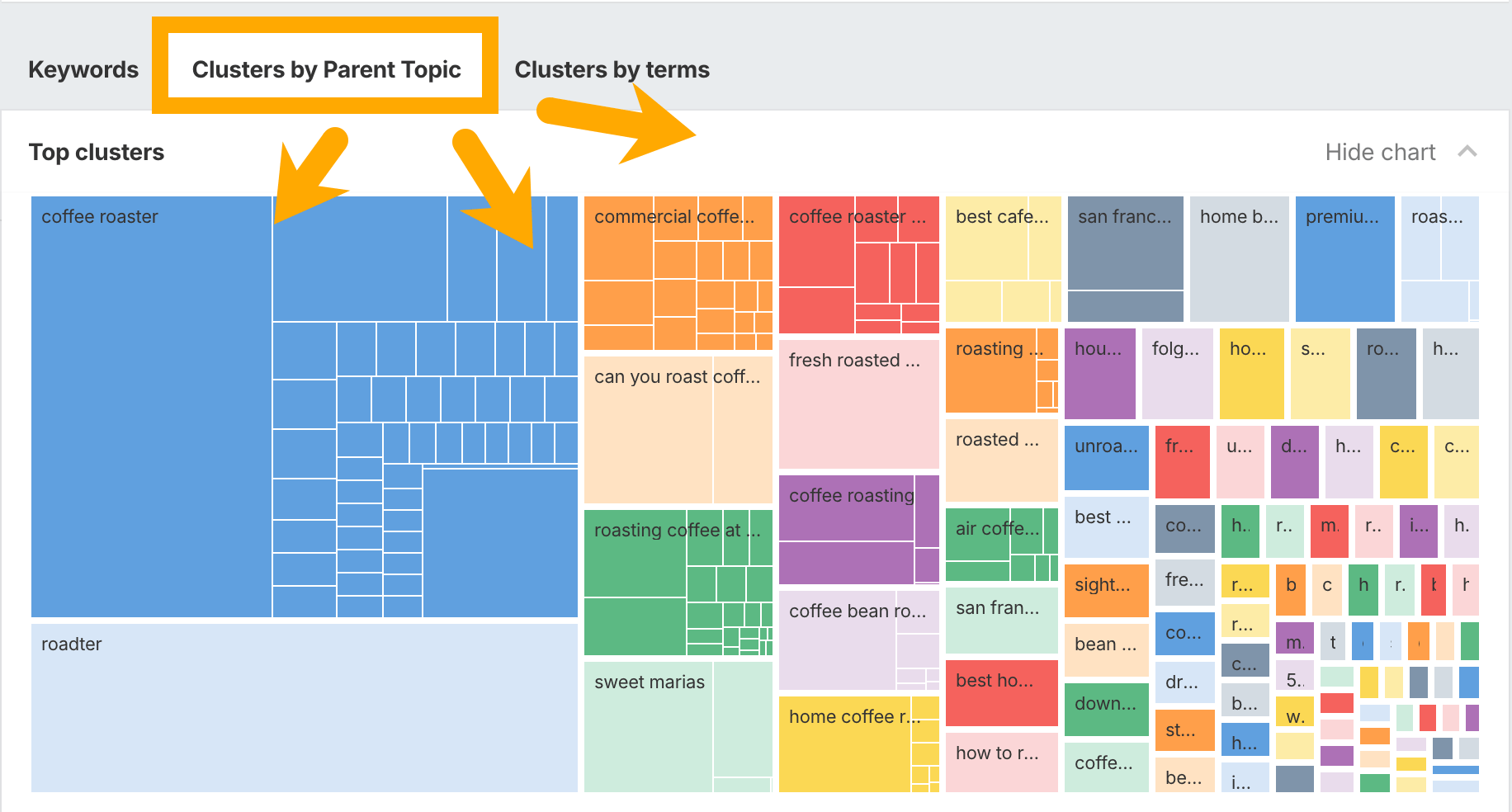
You should place Secondary Keywords anywhere they help explain the page topic more clearly. The goal is not to force them into every line. Instead, use them in places that search engines and readers check first. This helps Google understand your content and gives your page a better chance to rank for related searches.
Key page elements
- Title tag: Add one close variation if it fits naturally. Keep the main focus on your primary keyword.
- Meta description: Use Secondary Keywords to show more search intent and improve relevance.
- URL slug: Only include a secondary term if it stays short and clear. Do not stuff multiple phrases into the URL.
- H2s and H3s: This is one of the best places for Secondary Keywords. Add them to subheadings that match the topic of the section.
- Introduction: Mention one or two early in the page so search engines can quickly understand the full topic.
Body content
The main body is where Secondary Keywords work best. Use them in the sections where they make the most sense. For example, if your primary keyword is broad, a secondary term can support a specific angle, feature, question, or use case.
Try to place them in the first 100 words, in image alt text when relevant, and in short lists or examples. You can also use them in FAQ answers, product details, and summary paragraphs. If a keyword feels unnatural, skip it. Search engines are better at understanding context in 2026, so forced repetition can hurt readability.
Internal links and media
Anchor text is another smart place for Secondary Keywords. Link to related pages using clear, helpful wording instead of generic phrases like “click here.” Images, charts, and video captions can also support topical relevance when they match the page content.
- Use Secondary Keywords in internal link anchors when accurate.
- Add them to image file names or alt text only when the image truly shows that topic.
- Include them in FAQs to capture long-tail searches and People Also Ask results.
Use Secondary Keywords in Headings and Subheadings
Add Secondary Keywords to your headings and subheadings where they fit naturally. This helps search engines understand the page topic faster. It also makes your content easier for readers to scan. For example, use a main heading for your primary topic, then place Secondary Keywords in H2s and H3s that cover related questions or terms.
- Keep each heading clear and useful.
- Avoid stuffing too many Secondary Keywords into one title.
- Match subheadings to search intent and related terms from tools.
Place Secondary Keywords in Body Copy and Examples
Use Secondary Keywords where they help the reader, not where they feel forced. Add them to body copy, image alt text, product details, and short examples. This helps search engines understand the page topic while keeping your writing natural.
For example, if your main topic is email marketing, your Secondary Keywords might include “email subject lines,” “welcome email examples,” and “email open rates.” Place them in useful sentences, not a list. Google’s helpful content guidance supports clear, people-first writing.
Add Secondary Keywords to Title Tags, Meta Descriptions, and URLs Carefully
Use Secondary Keywords in title tags, meta descriptions, and URLs with care. Search engines still need one clear main topic, so avoid stuffing extra terms everywhere. Instead, place one strong variation in the title if it fits naturally, and add another in the meta description to improve relevance and clicks. Keep URLs short, clean, and stable.
- Match search intent first.
- Use only relevant Secondary Keywords.
- Avoid changing old URLs unless needed.
Use Secondary Keywords in Image Alt Text, Internal Links, and FAQs
Place Secondary Keywords where they add context, not clutter. Add them to image alt text only when they truly describe the image. This helps search engines and improves accessibility. Use Secondary Keywords in internal link anchor text to connect related pages and strengthen topical relevance.
- Write clear alt text, such as “SEO content brief with secondary keyword examples.”
- Vary internal anchors so links sound natural.
- Add Secondary Keywords to FAQ questions and answers when users may search those terms.
How to Map Secondary Keywords to the Right Pages
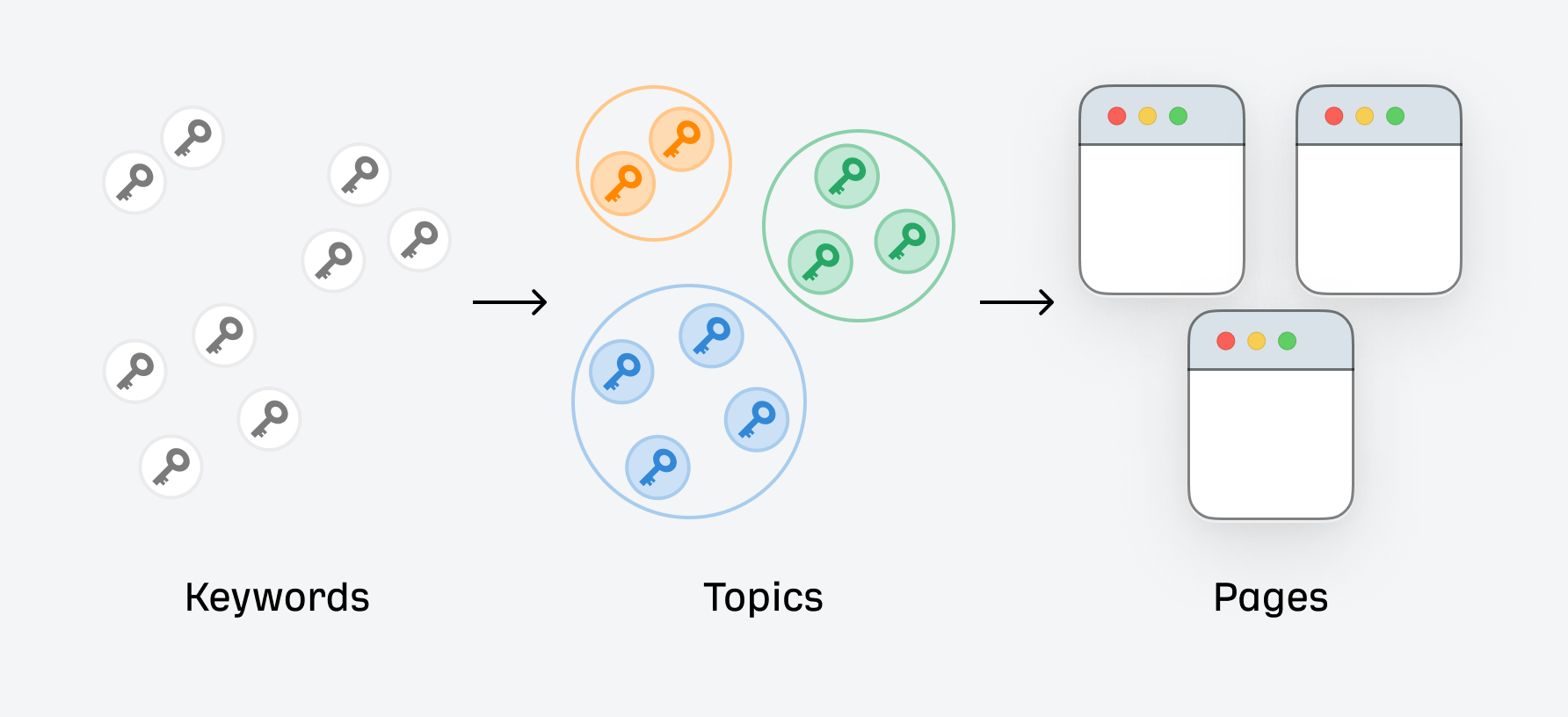
To map Secondary Keywords well, start with search intent. Each page should target one main keyword and a small group of related terms that match the same need. If a page is about “email marketing tools,” its secondary terms might include “best email software,” “email automation platform,” and “tools for newsletters.” All of those support the same topic without pulling the page in a new direction.
A simple way to do this is to build a keyword map in a spreadsheet. Add columns for the page URL, primary keyword, Secondary Keywords, search intent, and search volume. Then review each page to make sure the terms fit the content already on that URL. This helps you avoid keyword cannibalization, where two pages compete for the same search.
- Match by intent: Group Secondary Keywords that answer the same question or solve the same problem.
- Keep pages focused: Do not force unrelated terms onto one page just because they have traffic.
- Use SERPs as a guide: Search your target terms and compare the top-ranking pages. If the results are similar, the keywords can likely live on one page.
- Assign by page type: Product pages, blog posts, category pages, and landing pages often need different Secondary Keywords.
- Update old content: Add missing related terms to pages that already rank but need more depth.
Also, place Secondary Keywords in natural spots like subheads, body copy, image alt text, and internal anchors. Tools like Google Trends can help you spot useful variations. When every page has a clear keyword theme, your site becomes easier for users and search engines to understand.
Build a Keyword Map Around Search Intent
Start by grouping pages by search intent, such as learn, compare, or buy. Then assign one primary keyword and a small set of Secondary Keywords to each page. This keeps your content focused and helps search engines understand the topic.
- Match informational intent to guides, FAQs, and how-to pages.
- Use commercial intent for comparison, review, and pricing pages.
- Avoid giving the same Secondary Keywords to multiple pages.
A simple keyword map in a spreadsheet works well.
Prevent Keyword Cannibalization With Clear Page Roles
To avoid cannibalization, give each page one clear job. Pick a primary keyword for the main topic, then use Secondary Keywords only when they support that page’s intent. For example, one page can target “email marketing tools,” while another covers “best free email templates.”
- Map one search intent to one URL.
- Keep Secondary Keywords closely related, not overlapping.
- Use internal links to show which page is the main source.
Search Engine Land offer useful examples.
Mini Example of Secondary Keywords Across a Content Cluster
Here is a simple content cluster. Your main page targets Secondary Keywords for a broad guide. Then, supporting pages target related terms like “LSI keywords,” “semantic SEO,” and “keyword clustering.” Each page links back to the main guide and to one another where helpful. This shows search engines the pages are connected and cover the topic well. It also helps readers move from a general topic to a more specific one.
Advanced Secondary Keywords Strategies

Once you understand the basics, you can use Secondary Keywords in smarter ways to win more search traffic. The goal is not to stuff extra phrases into a page. Instead, you want to build stronger topic coverage, match more search intents, and help search engines see the full meaning of your content.
Map by search intent
A strong page often targets more than one type of search intent. Some Secondary Keywords answer basic questions, while others support comparison, pricing, or action-based searches. Group your terms by what the reader wants to do next.
- Informational: what secondary keywords are, examples, benefits
- Commercial: best keyword tools, keyword research software
- Transactional: SEO services, content optimization tools
This helps you place each phrase in the right section. It also keeps your page useful instead of repetitive.
Use clusters, not single terms
Many competitors stop at adding a few related phrases. A better strategy is to build a keyword cluster around the main topic. That means using Secondary Keywords, close variants, related questions, and common modifiers together.
For example, a page about keyword research could include terms like “LSI keywords,” “related keywords,” “keyword variations,” and “how to find secondary terms.” When these phrases appear naturally in headings, body text, image alt text, and FAQs, the page can rank for a wider set of searches.
Improve internal linking
Advanced SEO also means connecting pages with purpose. Use Secondary Keywords in internal anchor text when linking to deeper articles. This gives search engines more context and helps readers discover related content.
Let supporting pages target narrow terms, while the main page covers the broader topic. This hub-and-spoke model is especially useful for larger sites. HubSpot has a helpful overview of topic clusters for SEO.
Refresh with Search Console data
One of the best missed opportunities is updating content after it ranks. Check Google Search Console to find queries where your page gets impressions but few clicks. Those terms often make excellent Secondary Keywords to add or expand. Small updates can improve relevance, lift rankings, and bring in traffic you were already close to winning.
Use Clustering to Group Secondary Keywords by Topic
Clustering helps you organize Secondary Keywords into clear topic groups. Start with one main search intent, then place related terms under it. For example, a page about on-page SEO might group Secondary Keywords like “title tags,” “meta descriptions,” and “internal links.” This keeps your content focused and avoids keyword stuffing.
- Group keywords by intent, not just similar wording.
- Match each cluster to one page or one section.
- Use tools like Google Trends to spot related topics.
Done well, Secondary Keywords improve structure, relevance, and rankings.
Refresh Existing Content With New Secondary Keywords
Updating older pages is one of the fastest ways to improve rankings. Start by checking Search Console to find queries your page already shows up for but does not target well. Then add Secondary Keywords to weak spots like subheads, body copy, image alt text, and FAQs. This helps search engines understand the page in more detail.
Next, refresh examples, stats, and internal links so the update feels useful, not stuffed. Use Google Search Console to track gains from your new Secondary Keywords.
Build Topical Depth With Supporting Articles and Internal Links
Supporting articles help you rank for more Secondary Keywords without forcing every term onto one page. Create short, focused posts around related questions, use cases, or comparisons. Then link those pages back to your main article with clear anchor text.
- Cover one subtopic per page.
- Use natural internal links between related posts.
- Add helpful sources, such as Google’s SEO Starter Guide.
This builds topical depth, improves crawl paths, and gives your Secondary Keywords more chances to rank.
Mini Case Study: Optimizing One Page With Better Secondary Keywords
A simple example shows the impact of Secondary Keywords. An online pet store had a page targeting “dog food” but ranked poorly for related searches. After reviewing Google Search Console, the team added Secondary Keywords like “grain-free dog food,” “best dog food for puppies,” and “dry dog food brands” to the intro, product copy, FAQ, and image alt text.
Within weeks, the page gained more impressions and better clicks for long-tail searches. This worked because the new Secondary Keywords matched real search intent, not just the main term. As a result, one page started ranking for several useful variations instead of only one keyword.
Common Secondary Keywords Mistakes to Avoid
Using Secondary Keywords can improve relevance, but a few common mistakes can weaken your page instead of helping it rank. The goal is to support your main keyword, not distract from it.
- Using too many unrelated terms: Some writers add every similar phrase they can find. That makes the page feel messy and unfocused. Choose Secondary Keywords that match the same search intent as your primary topic.
- Keyword stuffing: Repeating the same phrases over and over hurts readability. Search engines are better at understanding context now, so write naturally.
- Ignoring user intent: A keyword may have high volume but still be a poor fit. If your page targets beginners, don’t fill it with advanced terms that confuse readers.
- Forgetting key places on the page: Many people add Secondary Keywords only in body text. It is often smarter to use them in subheadings, image alt text, meta descriptions, and FAQs when relevant.
- Skipping research: Guessing related terms can lead to weak choices. Use tools and sources like Google Search Central to find useful patterns.
Strong Secondary Keywords should feel natural, support the topic, and help readers find exactly what they need. If a phrase does not add clarity or value, leave it out.
Choosing Terms That Are Related but Not Relevant
Not every related term makes a good fit. Some words look close to your topic but miss the search intent, which can confuse readers and hurt rankings. Strong Secondary Keywords should support your main topic, not pull it in a new direction.
- Skip broad terms with a different goal.
- Avoid phrases that target another audience.
- Check search intent with Google’s helpful content guidance.
Choose Secondary Keywords that add context, answer related questions, and match the page’s purpose.
Overusing Secondary Keywords and Hurting Readability
Using Secondary Keywords too often can make your copy sound forced. Readers notice repetition fast, and search engines do too. Instead of stuffing the same phrase into every line, use close variants and place them where they fit best.
Good content should read smoothly first. Focus on meaning, not just keyword count.
Ignoring SERP Changes, Entities, and Real User Language
Search results change fast, so don’t set your Secondary Keywords once and forget them. Google now weighs entities, search intent, and the exact words real people use in queries, reviews, forums, and AI search prompts. Check the SERP often to spot new terms, question-based searches, and topic shifts. Then update your Secondary Keywords to match current language and related entities.
A Practical Workflow to Use Secondary Keywords
Here is a simple workflow to put Secondary Keywords to work without overthinking it. Start with your main keyword, then list close variations, related questions, and supporting terms. Tools like Google Trends and Google Search Central can help you spot useful patterns.
- Pick one main topic: Choose the primary keyword for the page first.
- Gather Secondary Keywords: Look for terms with the same search intent, common questions, and long-tail phrases.
- Group by intent: Put similar terms together, such as informational, comparison, or transactional phrases.
- Map them to page sections: Use Secondary Keywords in subheadings, body copy, image alt text, and FAQs where they fit naturally.
- Avoid stuffing: Write for people first. If a term sounds forced, skip it.
- Review performance: Check Google Search Console to see which queries bring impressions and clicks, then refine your copy.
This process helps Secondary Keywords support your main topic, improve topical relevance, and capture more search variations. As a result, your page can rank for a wider set of queries while still feeling clear and useful.
A Simple 5-Step Process From Research to Optimization
Use this simple process to find and apply Secondary Keywords without overcomplicating your SEO work.
- Step 1: Start with your main keyword and search intent.
- Step 2: Find related terms in Google Search, Google Trends, and Google Search Console.
- Step 3: Group Secondary Keywords by topic, question, or search stage.
- Step 4: Add them naturally to headings, body text, image alt text, and meta copy.
- Step 5: Track rankings and update pages as new Secondary Keywords appear.
What to Track After Publishing
After publishing, track how your page ranks for Secondary Keywords, not just your main term. Check impressions, clicks, and average position in Google Search Console. Also watch organic traffic, time on page, and bounce rate in Google Analytics.
- New keyword rankings and lost rankings
- Pages bringing traffic from Secondary Keywords
- Click-through rate from search results
- Conversions, leads, or sales from organic visits
If Secondary Keywords show impressions but few clicks, improve your title and meta description.
Final Thoughts on Secondary Keywords
Secondary Keywords help search engines understand your page in a fuller, more natural way. When you use them well, they support your main keyword, match more search intent, and improve your chances of ranking for related terms.
Instead of stuffing the same phrase again and again, build content around clear topics, common questions, and close variations. This approach makes your writing easier to read and more useful for visitors. It also helps your page stay relevant as search behavior changes in 2026.
- Choose Secondary Keywords that closely match the main topic.
- Add them naturally in headings, body text, image alt text, and meta tags.
- Track performance in Google Search Console.
- Review search quality guidance from Google Search Central.
Smart use of Secondary Keywords can strengthen topical relevance, improve visibility, and bring in better organic traffic.
Choose Secondary Keywords that closely match your main topic and the searcher’s goal. A good mix helps you cover related questions, terms, and subtopics without forcing extra phrases into the page. This improves clarity for readers and gives search engines stronger context.
Secondary Keywords help you cover related questions, terms, and search intent in one page. This makes your content more useful and easier for Google to understand. For example, add close variations, supporting phrases, and common terms your audience expects to see. As a result, your page feels more complete instead of thin or repetitive.
Read More: Modern Review Regulation: What Businesses Must Disclose in 2026


