

Mobile marketing has become a core part of how local businesses attract, inform, and convert nearby customers. A potential customer may discover a business through Google Search, an AI-generated search result, a social media post, a map listing, an SMS offer, or a digital advertisement—and increasingly, that interaction happens on a smartphone. For a local business, this means mobile marketing is not simply about making a desktop website smaller. It is about creating a fast, accessible, convenient experience that helps people move from discovery to action with as little friction as possible.
The importance of this experience is even greater as search becomes more conversational and AI-assisted. Google’s current guidance says its AI features, including AI Overviews and AI Mode, continue to rely on established SEO fundamentals such as crawlability, helpful content, strong page experience, textual information, high-quality media, and accurate Business Profile information.
For local companies, the practical goal is straightforward: make it easy for someone to understand what you offer, where you operate, why they should trust you, and what they should do next. That could mean calling the business, requesting a quote, booking an appointment, finding directions, placing an order, or visiting the physical location.
A strong mobile marketing strategy therefore combines responsive web design, performance optimization, local search visibility, location-based advertising, SMS and push messaging, mobile apps, and loyalty experiences. The following best practices explain how local businesses can build a mobile presence that supports both traditional search and the increasingly AI-influenced customer journey.
The Importance of Mobiles in Local Business Marketing in a Post-AI World
The relationship between mobile devices and local marketing has changed significantly. Smartphones are no longer just another channel through which customers browse a website. They often serve as the customer’s search engine, map, comparison tool, communication device, camera, payment method, and connection to local businesses.
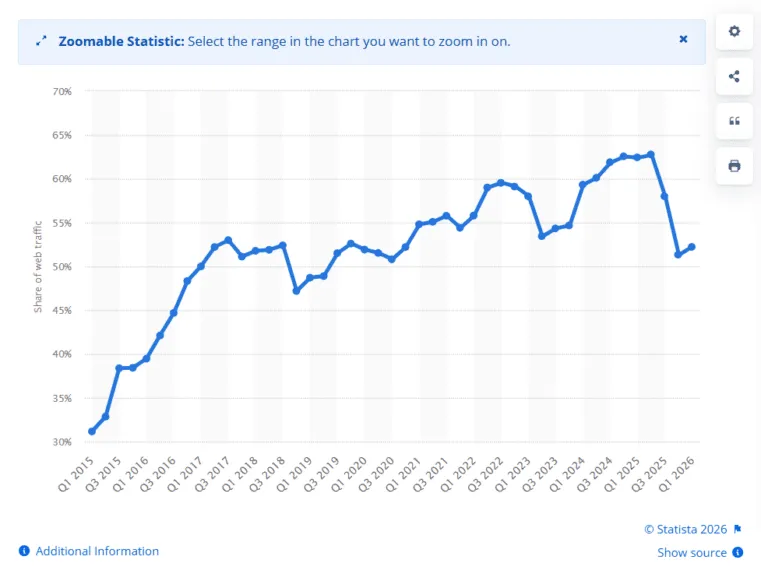
Image: Over half of internet traffic comes from mobile devices as of Q1 2026. (Source)
This matters because local purchase journeys are often driven by immediate intent. Someone searching for an emergency plumber, nearby restaurant, dental appointment, auto repair shop, home cleaning service, or local retailer may not want to spend several minutes navigating a complicated website. They want useful information quickly and an obvious way to take action.
AI-powered search adds another layer to this journey. Google explains that AI Overviews and AI Mode can surface supporting links from websites that meet the normal technical and content requirements for Search. Google also emphasizes that there are no special AI-only technical requirements; traditional fundamentals such as helpful content, crawlability, internal linking, page experience, textual content, high-quality images and accurate Business Profile information remain important.
For local businesses, this creates several important priorities.
Mobile Is Part of the Local Discovery Experience
A customer might encounter your business through an AI answer, conventional search result, Google Maps, a social platform, an advertisement, or a referral. Regardless of where discovery happens, the next step may take place on a smartphone.
If the customer taps through to your website and encounters tiny text, slow-loading images, difficult navigation, or an unclear phone number, the marketing journey can break down.
A mobile-friendly website therefore acts as the bridge between visibility and conversion.
Mobile Experience Supports Search Visibility
Google uses the mobile version of a website’s content for indexing and ranking under mobile-first indexing. Google also recommends responsive web design because it allows the same content and URL to adapt to different screen sizes while remaining easier to maintain.
This makes mobile optimization more than a design preference. Local businesses should make sure that important information available on desktop is also accessible on mobile, including:
- Service descriptions
- Business location and service areas
- Opening hours
- Contact information
- Pricing information where appropriate
- Reviews and trust signals
- Images and relevant media
- FAQs
- Booking or quote forms
- Important calls-to-action
Google specifically advises keeping the primary content equivalent between mobile and desktop versions because the mobile version is what Google uses for indexing.
Mobile Users Expect Less Friction
Mobile users interact with smaller screens and touch interfaces. A customer should not have to pinch and zoom to read a service description, hunt through several menus to find a phone number, or repeatedly tap a tiny button.
Interactive elements should be sufficiently large and separated from one another. Web.dev recommends tap targets around 48 CSS pixels, with appropriate spacing, to make touch interactions easier.
For local businesses, this is particularly important for high-intent actions such as:
- Call Now
- Get Directions
- Book Appointment
- Request a Quote
- Order Online
- Send a Message
- Check Availability
The easier these actions are to complete, the fewer opportunities there are for users to abandon the journey.
Mobile Performance Can Influence the Customer Experience
Speed is another major consideration. A mobile visitor may be using a slower connection or a less powerful device. Large images, unnecessary scripts, excessive animations, third-party tools, and poorly optimized code can all create delays.
Core Web Vitals provide useful measurements for real-world page experience. The current Core Web Vitals include Largest Contentful Paint (LCP) for loading performance, Interaction to Next Paint (INP) for responsiveness, and Cumulative Layout Shift (CLS) for visual stability. The commonly recommended “good” thresholds are LCP of 2.5 seconds or less, INP of 200 milliseconds or less, and CLS of 0.1 or less at the 75th percentile.
These measurements should not be treated as a magic ranking formula. Google describes page experience as a broader, holistic concept rather than one single ranking signal. Still, a fast, stable, responsive website is valuable because it improves the actual experience customers have with the business.
Mobile and Local Information Need to Work Together
A mobile strategy should also connect the website with local business information. Accurate business details help customers verify that they have found the right company.
Google allows verified businesses to manage important information such as address, contact information, business type, and photos through their Business Profile, helping that information appear across Google Search and Maps.
For businesses that serve specific locations, consistency matters. Your website, Business Profile, advertising, and other local listings should communicate the same essential information.
In a post-AI search environment, this becomes even more important because AI systems can use information from multiple sources to help answer local queries. Google notes that keeping Business Profile information up to date can help local businesses appear in both traditional Search and generative AI experiences.
The takeaway is simple: AI may change how customers discover businesses, but mobile usability still determines how easily those customers can act.
10 Best Practices for Mobile-Friendly Website Design
A mobile-friendly website should do more than fit within a smartphone screen. It should make information easy to consume and important actions easy to complete. These ten practices provide a practical foundation for local businesses.
1. Prioritize Responsive Design
Responsive design allows a website’s layout to adapt automatically to different screen sizes and devices. Instead of creating a completely separate experience for desktop, tablet, and mobile, responsive design uses flexible layouts, images, and CSS rules to provide an appropriate experience across devices.
Google recommends responsive web design as its preferred implementation because it generally uses the same URL and HTML while adapting the presentation to the user’s screen.
For a local business website, responsive design should cover more than the homepage. Check service pages, location pages, blogs, contact pages, forms, booking interfaces, menus, and pricing sections.
Also make sure the viewport is configured correctly so the page uses the device’s actual screen width rather than forcing users to zoom or scroll horizontally.
Practical tip: Test important pages on several real phones, not only a desktop browser resized to a narrow window.
2. Optimize for Speed
A beautiful mobile website is ineffective if customers have to wait for it to load.
Start by identifying the biggest sources of delay. Common issues include oversized images, unnecessary JavaScript, excessive third-party scripts, inefficient fonts, large video files, and poor caching or hosting configurations.
Pay particular attention to the page’s main visible content. LCP measures how quickly the largest visible content element loads, while INP evaluates how responsive the page is when users interact with it. CLS measures unexpected movement of content while the page loads.
For local businesses, speed optimization can include:
- Compressing and resizing images
- Serving modern image formats where appropriate
- Reducing unnecessary scripts
- Removing unused plugins
- Using browser and server caching
- Improving hosting performance
- Deferring non-critical resources
- Limiting third-party tracking and marketing scripts
- Monitoring real-user performance
Do not optimize based solely on a laboratory score. Monitor real-user data when available and prioritize problems that affect actual customers.
3. Think Mobile-First
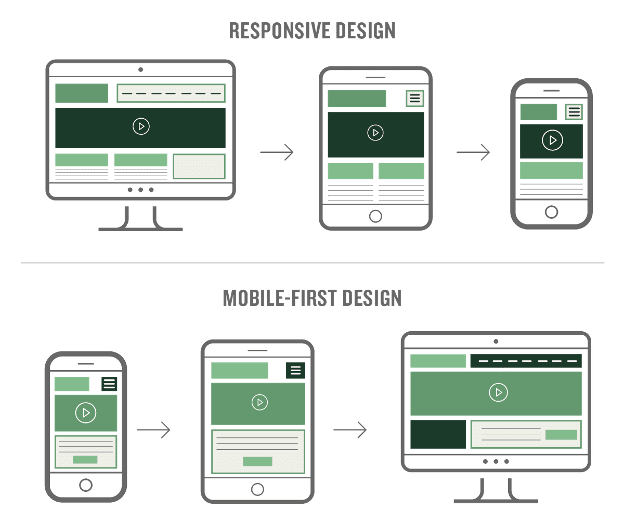
Image: As web traffic increasingly comes from a primarily mobile audience, the mobile-first design approach is steadily gaining popularity. (Source)
Mobile-first means designing around the needs of mobile users rather than treating mobile as a smaller version of the desktop website.
Start by asking what a customer is most likely to need immediately. For a local service business, that might be the service area, phone number, opening hours, emergency availability, pricing information, or quote form.
Then build the page hierarchy around those needs.
Mobile-first design does not mean deleting useful information. Google specifically recommends that the mobile version contain equivalent primary content to the desktop version because mobile content is used for indexing.
Instead, improve the presentation. Use concise sections, descriptive headings, expandable content where appropriate, short paragraphs, bullets, and clear visual hierarchy.
4. Prioritize Text Legibility
If visitors have to zoom in to read your content, the website is not providing a good mobile experience.
Use an easily readable font, sufficient contrast, comfortable line spacing, and a font size that works on smaller screens. Avoid placing long paragraphs inside narrow columns or using decorative fonts for essential information.
Legibility also supports accessibility. Responsive design can help users who rely on zoom or magnification, while allowing users to enlarge content without breaking the layout makes the website more flexible.
For local businesses, pay particular attention to information customers may need quickly:
- Phone numbers
- Addresses
- Opening hours
- Prices
- Service names
- Appointment instructions
- Directions
- Emergency contact information
Make these details visually easy to scan.
5. Shorten Your Copy
Mobile screens make long blocks of text harder to consume. That does not mean local businesses should remove useful information. Instead, make the information more scannable.
Break lengthy sections into:
- Short paragraphs
- Descriptive headings
- Bullet points
- Numbered steps
- FAQs
- Highlighted benefits
- Brief service summaries
- Clear supporting details
Lead with the information most relevant to the visitor.
For example, instead of beginning a local HVAC service page with several paragraphs about company history, lead with the services offered, locations served, response times where accurate, customer benefits, and the next step.
Shorter copy should mean less friction, not less substance.
6. Add Clickable Calls-to-Action (CTAs)
A mobile CTA should be designed for a finger, not a mouse.
Instead of forcing users to copy a phone number, find an email address, or navigate through several pages, provide direct actions such as:
- Call Now
- Get a Free Quote
- Book an Appointment
- Get Directions
- Message Us
- Order Online
Phone numbers can use tap-to-call functionality, while addresses can link to appropriate map directions.
Make buttons visually distinct and sufficiently large. Touch targets should be easy to activate without accidentally pressing nearby elements; around 48 CSS pixels is a useful accessibility benchmark.
The CTA should also match the user’s intent. Someone looking for emergency repair should see a prominent contact option, while someone comparing services may need a quote request or service-details CTA first.
7. Simplify Navigation
Mobile navigation should help users find what they need without overwhelming them.
A local business website often does not need a complicated menu containing every page at the top level. Group related information logically and prioritize pages that support customer decisions.
A useful mobile navigation structure might include:
- Services
- Locations
- About
- Reviews
- FAQs
- Contact
Depending on the business, booking, pricing, menu, products, or emergency services may deserve higher priority.
Make sure the navigation is easy to open, close, and use with a finger. Avoid tiny menu links placed too close together.
Also consider what happens after a visitor enters the site through a search result. A customer may land directly on a service page rather than the homepage, so every important page should provide a clear path to the next action.
8. Make Images Mobile-Friendly
Images can strengthen trust, demonstrate services, show products, and help customers understand what a business offers. But large images can also consume significant bandwidth.
Responsive image techniques allow browsers to select an appropriate image based on the device and display conditions. Serving unnecessarily large desktop images to mobile devices can waste data and slow down the experience.
For mobile optimization:
- Resize images to appropriate dimensions.
- Compress files without unnecessarily reducing quality.
- Use responsive image techniques such as
srcsetwhere appropriate. - Choose suitable modern formats.
- Reserve image dimensions to reduce layout shifts.
- Use descriptive alt text for meaningful images.
- Avoid placing essential text inside images.
- Lazy-load appropriate below-the-fold images.
Google also recommends ensuring that mobile pages contain high-quality images, appropriate alt text, and equivalent important visual content.
For local businesses, prioritize authentic visuals over generic stock photography when possible. Photos of the actual storefront, team, completed projects, products, facilities, or service work can help customers understand what they can expect.
9. Avoid Pop-Ups
Pop-ups can be useful when they provide genuine value, but intrusive overlays are especially disruptive on mobile devices because the available screen space is limited.
A visitor who arrives from Search should be able to see the page’s primary content without immediately encountering a full-screen promotion, newsletter form, app-install request, or other interruption.
Google recommends avoiding intrusive interstitials and dialogs that obstruct access to content. It suggests using less disruptive alternatives, such as banners, where appropriate.
This does not mean every modal is prohibited or that every pop-up is harmful. Context matters. For example, legally required consent or an action initiated by the user can require a dialog. The goal is to avoid making the primary content difficult to access.
For local marketing, consider whether the pop-up is actually helping the customer. If someone is trying to find your phone number, covering the page with a promotional form is likely counterproductive.
10. Make It Easy to Contact You
The ultimate purpose of many local mobile journeys is an action: a call, appointment, quote request, message, order, or visit.
Make that action obvious.
Place essential contact options where users can find them without unnecessary searching. Depending on your business model, this might include:
- A click-to-call phone number
- Online appointment booking
- Quote request forms
- Live or asynchronous messaging
- Business hours
- Physical address
- Map directions
- Online ordering
- Contact buttons in the header and footer
Keep forms short whenever possible. Ask only for information necessary to begin the conversation, and make fields easy to complete on a touchscreen.
Also verify that contact details are consistent with your Google Business Profile and other business information. Google recommends establishing and maintaining accurate business details so customers can find the correct location, website, and contact information in Search and Maps.
Most importantly, test every contact method yourself. A phone button that does not open the phone app, a form that fails on mobile, or a booking system that requires excessive scrolling can turn valuable local traffic into lost opportunities.
A strong mobile website ultimately does one thing exceptionally well: it makes the next step obvious and easy. For local businesses competing in an increasingly AI-assisted search environment, that combination of discoverability, usability, speed, accessibility, and conversion readiness provides a stronger foundation for turning mobile visitors into real customers.
How to Utilize Location-Based Marketing and Mobile-Friendly Ads
Location-based marketing allows local businesses to make mobile campaigns more relevant to where customers are and, in some cases, where they have recently been. Instead of showing the same message to everyone, businesses can tailor ads, offers, and experiences around geographic areas, service regions, store locations, or local customer intent.
This is particularly useful for businesses where proximity affects the buying decision, such as restaurants, retailers, healthcare practices, home services, automotive businesses, salons, and entertainment venues. However, location targeting should support a clear business objective rather than simply collecting or using location data because it is available.
A strong approach combines location-aware advertising with an accurate Google Business Profile, locally relevant landing pages, mobile-friendly creative, and clear conversion actions such as Call, Get Directions, Book Now, Visit Today, or Request a Quote.
1. Embrace Geotargeting and Geofencing
Geotargeting allows advertisers to focus campaigns on people in selected geographic areas. Depending on the advertising platform, targeting can be based on locations such as countries, regions, cities, postal areas, or other available geographic segments.
For a local business, this can prevent advertising budgets from being wasted on people outside the company’s actual service area. A home remodeling company, for example, could focus campaigns on the communities it serves instead of advertising across an entire state.
Geofencing takes location-based marketing a step further by creating a virtual boundary around a physical area or location. When supported by the relevant advertising platform and user permissions, campaigns can be designed around people entering or being present within a defined geographic area.
Businesses can use these approaches for different purposes:
- Target customers within a practical service radius.
- Promote a physical store to nearby audiences.
- Advertise seasonal events to people in the surrounding area.
- Reach customers around complementary businesses or venues where appropriate.
- Create separate campaigns for different service areas.
- Adjust ad messaging based on local needs or offers.
However, geographic targeting should not be confused with guaranteed physical presence. Location signals can be imperfect, and platforms have their own targeting rules, privacy controls, and audience limitations. Businesses should also respect applicable privacy requirements and platform policies.
The best campaigns combine location with intent, demographics, search behavior, or other legitimate audience signals rather than relying on location alone.
2. Optimize Your Google Business Profile
For local businesses, the Google Business Profile should be treated as an important part of the mobile customer journey—not simply as a directory listing.
Google says local results are primarily based on relevance, distance, and prominence. It also recommends keeping business information complete and accurate, maintaining current hours, responding to reviews, and adding photos and videos.
Make sure your profile clearly communicates:
- Business name
- Correct address or service area
- Phone number
- Primary business category
- Relevant business attributes
- Regular and special hours
- Website
- Services or products where available
- High-quality photos and videos
- Customer reviews and responses
This information becomes particularly important for mobile users because Google Search and Maps can be used to immediately call a business, visit its website, request directions, or evaluate reviews.
Don’t try to manipulate your profile by stuffing location keywords into the business name or adding inaccurate information. Instead, provide complete, genuine information that helps Google and customers understand the business.
Your website should reinforce the same information. If your Business Profile says you serve certain communities but your website provides no evidence of those service areas, the overall customer experience becomes less convincing.
3. Leverage Localized Ads
Localized mobile advertising should make the connection between the customer’s location and your offer immediately understandable.
Instead of using one generic advertisement for every market, create variations that reflect the locations you actually serve. For example:
Need a Plumber in [City]?
Same-day service for homes and businesses. Call for availability.
A localized ad can be more relevant because it addresses the customer’s immediate geographic context. But localization should be meaningful rather than simply inserting a city name into every advertisement.
Consider adapting:
- Headlines
- Offers
- Images
- Landing pages
- Service descriptions
- Testimonials
- Store information
- Calls-to-action
- Service-area messaging
The landing page is especially important. If someone clicks an advertisement mentioning a particular city and lands on a generic homepage with no local context, the relevance created by the ad can quickly disappear.
For multiple locations, consider creating genuinely useful location pages that explain the services available in each area rather than producing near-identical pages with only the city name changed.
Mobile ads should also be designed for small screens. Use concise headlines, readable text, clear branding, and a CTA that matches the intended action. If the goal is to generate phone calls, make calling easy. If the goal is store visits, emphasize location and directions.
4. Experiment with Proximity Offers
Proximity marketing can be particularly effective when a customer is already close enough to take action.
A retailer might promote a limited-time in-store offer to nearby audiences. A restaurant could advertise a lunch special during a relevant period. A service business might promote availability in a specific service area.
The key is to connect proximity + timing + value.
For example:
Weak:
“Visit our store today.”
Stronger:
“Nearby? Get 15% off selected items in-store today.”
The second message gives the customer a reason to act.
Possible proximity-based campaigns include:
- Same-day local discounts
- Limited-time store offers
- Event promotions
- Lunch or happy-hour promotions
- Local appointment availability
- Seasonal promotions
- New-store awareness campaigns
- Loyalty rewards
However, avoid excessive targeting or messages that make customers uncomfortable. A useful offer should feel relevant, not invasive.
Businesses should also measure whether proximity campaigns actually produce incremental results. Track metrics such as clicks, calls, coupon redemptions, store visits where reliable measurement is available, bookings, and revenue—not simply impressions.
5. Use AR for Engagement
Augmented reality (AR) can give local businesses another way to connect mobile users with products, locations, and experiences.
AR is particularly useful when customers benefit from visualizing something before making a decision. Depending on the business, that might include:
- Seeing how furniture could look in a room
- Virtually trying certain products
- Previewing colors or finishes
- Exploring products interactively
- Navigating or interacting with physical locations
- Creating branded experiences around events or promotions
AR should not be adopted simply because it is technologically interesting. It needs to solve a customer problem or make the buying experience more useful.
For example, a furniture retailer could use AR to help customers visualize a product in their home. That creates a direct connection between mobile technology and the purchasing decision.
For smaller local businesses, a lightweight AR campaign can sometimes be more practical than building a complete standalone application. The right implementation depends on the audience, product, budget, technical capabilities, and expected business outcome.
Tips for Leveraging SMS and Push Notifications (Mobile SMS Marketing)
SMS and push notifications give local businesses a direct way to communicate with customers who have already opted into the relevant communication channel. Unlike search or social advertising, these channels can reach an existing customer relationship without requiring the customer to discover the business again.
That direct access makes them valuable for appointment reminders, order updates, loyalty rewards, event announcements, time-sensitive offers, and other messages with clear customer value.
The important distinction is that permission comes first. Businesses should not treat a phone number collected for one purpose as automatic permission to send unrelated promotional messages.
1. Keep It Short and Sweet
Mobile messages should communicate the important information quickly.
A useful SMS generally answers three questions:
- What is this about?
- Why should I care?
- What should I do next?
For example:
Green Valley Dental: Your cleaning appointment is tomorrow at 10 AM. Need to reschedule? Reply or call us.
For promotional messages:
City Café: Today only—20% off lunch for loyalty members. Show this message when you order. Reply STOP to opt out.
Avoid filling messages with unnecessary introductions, multiple offers, excessive punctuation, or lengthy explanations.
Push notifications should follow the same principle. The notification should earn the tap by communicating a clear benefit or useful update.
2. Personalize Your Messages
Personalization can make mobile messages more relevant, but it should be based on information the customer has legitimately provided or that the business is permitted to use.
Depending on the business, personalization might include:
- Customer name
- Previous purchase category
- Appointment type
- Loyalty status
- Preferred location
- Relevant service
- Abandoned booking or cart
- Upcoming appointment
- Local promotion
The goal is not to make every message appear highly personalized for its own sake. The goal is to make the message more useful.
Segmentation is often more valuable than simply inserting a customer’s first name. A restaurant might send different promotions to lunch customers and dinner customers. A salon might communicate differently with customers due for a particular service. A retailer might send product-specific offers based on legitimate customer preferences.
3. Time It Right
Timing can determine whether a mobile message feels helpful or annoying.
Consider the customer’s likely context before sending a message. Appointment reminders should arrive early enough to be useful. Time-sensitive promotions should reach customers while they can still act. A restaurant might promote a lunch offer before the lunch decision has already been made.
Businesses should avoid sending promotional messages at unreasonable hours or sending messages so frequently that customers begin ignoring them.
Create a communication schedule based on:
- Customer expectations
- Business hours
- Message urgency
- Customer time zone
- Offer duration
- Previous engagement
- Industry norms
It is also useful to test timing rather than assuming one send time works for every audience. Monitor clicks, conversions, bookings, opt-outs, and other meaningful outcomes.
4. Offer Exclusive Deals
One of the strongest reasons for customers to opt into SMS or push notifications is exclusive value.
Instead of sending messages that simply repeat information available everywhere else, give subscribers a reason to remain subscribed.
Possible incentives include:
- Subscriber-only discounts
- Early access to sales
- Birthday rewards
- Loyalty points
- Limited-time offers
- Appointment availability
- Local event invitations
- New-product previews
- Free add-ons
- Members-only promotions
The offer does not always need to be a discount. Convenience can also be valuable.
For example, a healthcare practice can use SMS for appointment reminders and confirmations. A restaurant can send order-ready notifications. A local retailer can notify customers when a reserved product is available.
This approach turns mobile messaging into a service channel, not just an advertising channel.
5. Ensure Compliance
Compliance should be built into the SMS strategy from the beginning.
Businesses should obtain the appropriate consent before sending marketing messages, clearly communicate what subscribers are agreeing to receive, maintain records of consent, and provide a straightforward way to stop future messages.
Requirements vary by country, jurisdiction, message type, and communication platform. Businesses should therefore review the laws and carrier/platform requirements that apply to their audience rather than relying on a generic checklist.
For U.S. SMS programs, for example, A2P 10DLC registration requirements can involve documenting the campaign’s opt-in process, privacy policy, terms, message flow, sample messages, and opt-out mechanism. Twilio’s current guidance also emphasizes that businesses should not solicit SMS opt-in through a message sent before the user has consented.
A responsible SMS program should therefore:
- Obtain appropriate permission before marketing messages.
- Clearly identify the business sending the message.
- Explain the nature of the messages where required.
- Provide an easy opt-out mechanism.
- Honor opt-out requests promptly.
- Maintain appropriate consent records.
- Avoid purchasing or using questionable contact lists.
- Follow applicable privacy, telecommunications, and advertising laws.
- Review carrier and messaging-platform requirements.
Consent should also be treated as an ongoing relationship. If customers consistently receive irrelevant messages, excessive promotions, or communications they did not expect, they may unsubscribe—even if the original opt-in was technically valid.
The most effective local SMS and push strategies therefore combine permission, relevance, timing, value, and restraint. When customers know why they are receiving messages and consistently get something useful from them, mobile messaging can become a dependable extension of the local customer experience rather than another source of digital noise.
The Role of Mobile Apps and Loyalty Programs
Mobile apps can give local businesses a direct, ongoing relationship with customers, but an app is not automatically the right investment for every business. The strongest use cases usually involve repeat purchases, frequent appointments, loyalty rewards, ordering, reservations, memberships, or other recurring interactions.
For businesses with enough repeat engagement, combining an app with a loyalty program can turn occasional customers into returning customers. It can also make routine actions—such as reordering, booking, checking rewards, or receiving updates—more convenient.
The key is to build an experience that provides genuine utility rather than creating an app simply because competitors have one.
1. Create a Direct Communication Channel
A mobile app can provide a branded communication channel that businesses control more directly than social media platforms.
Depending on the app’s capabilities and customer permissions, businesses can use it for:
- Order and booking updates
- Appointment reminders
- Loyalty notifications
- New-product announcements
- Personalized offers
- Event invitations
- Service updates
- Account information
- Important customer messages
Push notifications can be particularly useful when there is a legitimate reason for customers to receive timely information. However, businesses should avoid excessive notifications. If every interaction results in a promotional message, customers may disable notifications or uninstall the app.
The objective should be to make notifications useful, expected, and relevant.
2. Integrate Loyalty Programs
A mobile app can make a loyalty program easier to access and manage.
Instead of requiring customers to carry a physical loyalty card, they can potentially check points, view available rewards, redeem offers, or receive relevant updates directly through their phones.
Local businesses can structure loyalty programs around different behaviors, such as:
- Purchases
- Repeat appointments
- Referrals
- Memberships
- Reviews where appropriate and permitted
- Event participation
- Product milestones
- Birthday or anniversary rewards
For example, a local coffee shop could allow customers to track rewards and redeem a free item through its app. A salon could offer loyalty benefits based on completed appointments. A retailer could provide members with early access to selected promotions.
The important consideration is simplicity. Customers should understand how they earn rewards, what those rewards are worth, and how to redeem them without navigating a complicated system.
3. Enhance the Customer Experience
The best business apps solve customer problems.
For a restaurant, that could mean mobile ordering, reservations, saved preferences, or order tracking. For a service business, it might mean appointment booking, reminders, invoices, or service history. For a retailer, it could involve product browsing, loyalty rewards, digital receipts, or convenient reordering.
Before developing an app, identify the mobile tasks customers perform repeatedly and ask whether an app would make those tasks significantly easier.
Useful app features might include:
- One-tap reordering
- Appointment booking
- Digital loyalty cards
- Saved customer preferences
- Order tracking
- Digital receipts
- Store information
- Location and directions
- Customer support
- Membership management
- Personalized recommendations
A well-designed app should reduce friction. If customers can complete the same task more easily through a mobile website, a dedicated app may not provide enough additional value to justify the investment.
4. Leverage Data Insights
With appropriate consent and privacy practices, first-party customer data can help local businesses understand how customers interact with their digital experiences.
Businesses may be able to analyze information such as:
- Frequently purchased products
- Booking patterns
- Reward redemption
- Customer engagement
- Repeat purchase behavior
- Popular services
- Notification interactions
- App usage patterns
These insights can inform marketing decisions. For example, a business may discover that certain customers frequently purchase a particular service and develop a relevant reminder or loyalty offer.
However, data collection should be purposeful and transparent. Businesses should collect only information they genuinely need, explain relevant data practices clearly, protect customer information, and follow applicable privacy requirements.
The goal is not to collect as much data as possible. It is to use relevant first-party insights to improve customer experiences and marketing decisions.
5. Keep It Engaging
An app needs a reason for customers to keep using it.
Useful engagement strategies include:
- New loyalty rewards
- Personalized recommendations
- Limited-time benefits
- Relevant reminders
- New product announcements
- Exclusive member experiences
- Convenient account features
- Seasonal promotions
- Useful service updates
Avoid turning engagement into notification overload. Customers should be able to control notifications and should not feel pressured to interact with the app constantly.
For local businesses, utility is often the strongest form of engagement. If the app makes ordering, booking, earning rewards, or managing an account easier, customers have a practical reason to return.
Ultimately, mobile apps and loyalty programs work best when they complement the broader mobile marketing strategy. They should connect naturally with the business website, local search presence, advertising, email, SMS, social media, and in-store experience.
Frequently Asked Questions (FAQs) on Mobile Marketing for Local Businesses
What Is Mobile Marketing and Why Is It Important for Local Businesses?
Mobile marketing is the practice of reaching and engaging customers through mobile devices and mobile-focused channels. It can include mobile-friendly websites, search and display advertising, location-based campaigns, SMS, push notifications, mobile apps, social media, and mobile-specific offers.
It is particularly important for local businesses because smartphones often play a central role in discovering nearby products and services. A customer can search for a business, compare options, read reviews, check directions, visit a website, make a call, book an appointment, or place an order from the same device.
A strong mobile marketing strategy therefore helps local businesses connect discovery with immediate action.
How Do Mobile Marketing Campaigns Help Drive Local Sales?
Mobile campaigns can drive local sales by reaching customers at relevant moments and reducing the friction between interest and purchase.
For example, a local business can use:
- Location-targeted advertising to reach relevant audiences.
- Mobile search campaigns to capture high-intent searches.
- SMS to promote time-sensitive offers.
- Push notifications to engage existing customers.
- Mobile-friendly landing pages to improve conversions.
- Click-to-call CTAs to generate inquiries.
- Mobile booking systems to capture appointments.
- Loyalty programs to encourage repeat purchases.
The strongest campaigns are not necessarily those that generate the most clicks. Businesses should connect campaigns to meaningful outcomes such as calls, bookings, quote requests, purchases, store visits where measurable, and repeat customers.
What Is Mobile Content Marketing and How Does It Differ From Traditional Content Marketing?
Mobile content marketing involves creating and distributing useful content with the needs and behavior of mobile users in mind.
The underlying principle is similar to traditional content marketing: provide information that helps a specific audience solve a problem, answer a question, or make a decision. The difference is that mobile content must account for smaller screens, touch interactions, shorter attention windows, mobile search behavior, and the context in which people use smartphones.
For example, a local home-services company might publish a detailed guide about preventing water damage. The content can remain comprehensive, but the mobile version should use readable text, short sections, descriptive headings, images that load efficiently, and clear calls-to-action.
Mobile content marketing is therefore not simply shorter content. It is content designed to remain useful and easy to consume on a mobile device.
How Can AI Improve Mobile Marketing Strategies?
AI can help businesses analyze customer behavior, personalize experiences, generate content variations, optimize campaigns, identify patterns, and automate certain marketing tasks.
For local businesses, practical applications can include:
- Segmenting audiences based on legitimate customer data.
- Identifying patterns in campaign performance.
- Generating variations of ad copy for testing.
- Personalizing recommendations.
- Predicting potential customer actions where appropriate.
- Automating customer-service responses.
- Analyzing reviews and customer feedback.
- Improving marketing workflow efficiency.
AI can also help marketers process large amounts of information more quickly. However, it should support rather than replace human judgment.
Businesses should review AI-generated content and recommendations for accuracy, relevance, brand consistency, privacy, and potential bias. Customer data should also be handled according to applicable privacy requirements.
For local businesses, the most valuable use of AI is generally not producing large quantities of generic marketing material. It is using technology to make customer interactions more relevant, efficient, and useful.
Are SMS and Push Notifications Still Effective in 2026?
Yes. SMS and push notifications can still be effective in 2026, particularly when customers have explicitly opted in and the messages provide genuine value.
Their effectiveness depends heavily on relevance, timing, frequency, personalization, and consent. A useful appointment reminder or order notification serves a different purpose from an unsolicited promotional message.
Local businesses can use these channels for:
- Appointment reminders
- Order updates
- Loyalty rewards
- Limited-time offers
- Event announcements
- New-product notifications
- Membership updates
- Service reminders
The important point is that effectiveness should not be measured simply by whether a message was delivered or opened. Track outcomes such as clicks, bookings, purchases, redemptions, repeat visits, and opt-out rates.
Businesses should also comply with applicable telecommunications, privacy, and marketing laws and the requirements of the messaging platform they use.
When used responsibly, SMS and push notifications remain valuable because they provide a direct way to communicate with customers who have already chosen to hear from the business.
Read More: What are Backlinks and Why are they Crucial for SEO?


