

YouTube is the second-largest search engine in the world, right after Google. With over 2 billion logged-in monthly users, ranking your videos higher can significantly boost your visibility, engagement, and subscriber growth. But how do you ensure your content stands out in such a competitive space? The answer lies in YouTube SEO (Search Engine Optimization).
SEO isn’t just for websites—applying the right strategies to your YouTube videos can help them rank higher in both YouTube and Google search results. By optimizing key elements like titles, descriptions, tags, and engagement metrics, you can increase your video’s chances of appearing in recommended feeds and search rankings.
In this guide, we’ll explore 9 powerful YouTube SEO tips to help you optimize your videos, attract more viewers, and grow your channel organically. Whether you’re a beginner or an experienced creator, these strategies will give you a competitive edge in the YouTube algorithm.
9 YouTube SEO Tips: How To Optimize YouTube Videos
1. Understand YouTube’s Ranking Algorithm
YouTube’s algorithm determines which videos get recommended and ranked higher in search results. To optimize your videos effectively, you need to know what factors influence this algorithm. Here are the key ranking signals:
-
Watch Time & Audience Retention: YouTube prioritizes videos that keep viewers engaged longer. A high average watch time signals that your content is valuable.
-
Click-Through Rate (CTR): If more people click on your video after seeing it in search or recommendations, YouTube sees it as relevant and engaging.
-
User Engagement: Likes, comments, shares, and subscriptions indicate that viewers find your content worthwhile.
-
Relevance & Keywords: YouTube analyzes your title, description, and tags to understand your video’s topic and match it with search queries.
-
Session Time: If your video leads viewers to watch more content (on your channel or others), it boosts your ranking.
Pro Tip: Focus on creating high-quality, engaging content that keeps viewers watching longer and encourages interaction.
2. Optimize Video Titles
Your video title is one of the most critical ranking factors—it tells YouTube and viewers what your content is about. A well-optimized title improves both search rankings and click-through rates (CTR).
Best Practices for YouTube Video Titles:
✅ Include Primary Keywords Early – Place your main keyword near the beginning of the title (e.g., “How to Use SEO for YouTube Videos” instead of “A Guide on Using SEO for Videos on YouTube”).
✅ Keep It Under 60 Characters – Long titles get cut off in search results.
✅ Make It Engaging & Click-Worthy – Use power words like “Ultimate,” “Secret,” “Proven,” or “Easy” to spark curiosity.
✅ Avoid Clickbait – Misleading titles hurt watch time and trust.
✅ Add Brackets or Parentheses – *(2024 Guide), [Tutorial], (Step-by-Step)* can boost CTR.
Example of an Optimized Title:
❌ “SEO Tips”
✅ “YouTube SEO Tips: How to Rank #1 in 2024 (Proven Strategy)”
Pro Tip: Use tools like TubeBuddy or VidIQ to analyze keyword competition and optimize your titles effectively.
3. Use Video Descriptions Effectively
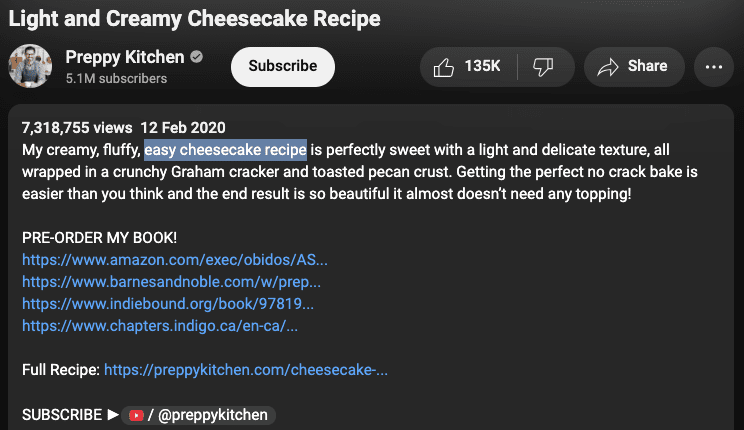
Your video description is prime real estate for YouTube SEO and viewer engagement. A well-crafted description helps YouTube understand your content, improves search rankings, and provides valuable context to viewers.
How to Write a High-Converting YouTube Description:
✅ First 2-3 Lines Are Critical – YouTube shows only the first ~100 characters in search results, so place your most important keywords and a compelling hook here.
✅ Include Target Keywords Naturally – Use your primary keyword and related terms (LSI keywords) to help YouTube categorize your video.
✅ Provide Detailed Content Summary – Explain what your video covers, including timestamps if applicable (e.g., “0:45 – How to Research Keywords”).
✅ Add Relevant Links –
-
Link to your website, social media, or affiliate products (if applicable).
-
Include a subscription CTA (e.g., “Subscribe here: [Channel Link]”).
✅ Use Hashtags Wisely – Add 2-3 relevant hashtags (e.g., #YouTubeSEO, #VideoMarketing) to help with discoverability.
✅ Optimize Length (250-300 words ideal) – Longer descriptions with structured formatting perform better.
Example of an Optimized Description:
📌 “Want to rank your YouTube videos higher? In this guide, you’ll learn proven YouTube SEO strategies to boost views and subscribers fast! 🔥*
📌 Timestamps:
0:00 – Intro
1:15 – How YouTube’s Algorithm Works
3:30 – Best Keyword Research Tools
5:45 – Optimizing Titles & Descriptions
📌 Resources mentioned:
-
TubeBuddy (Keyword Tool): [Link]
-
Free SEO Checklist: [Download]
🔔 Subscribe for more YouTube growth tips! [Channel Link]
#YouTubeSEO #VideoMarketing #GrowYourChannel”*
4. Pay Attention to Tags and Keywords
Tags help YouTube understand your video’s context and connect it with relevant searches. While less impactful than titles or descriptions, they still play a supporting role in ranking.
Best Practices for YouTube Tags:
✅ Primary Keyword First – Your first tag should be your exact target keyword (e.g., “youtube seo tips”).
✅ Use a Mix of Broad and Specific Tags –
-
Broad: “SEO tips”
-
Specific: “how to rank youtube videos 2024”
✅ Include Synonyms & Misspellings – Cover variations users might search (e.g., “YouTube optimization” instead of just “YouTube SEO”).
✅ Limit to 30-40 Tags Max – Overstuffing looks spammy; focus on relevance.
✅ Analyze Competitor Tags – Use tools like VidIQ or TubeBuddy to see which tags top-ranking videos use.
Example of Effective Tags:
youtube seo, youtube seo 2025, video seo tips, how to rank youtube videos,
youtube algorithm, youtube keywords, get more youtube views, youtube growth
Pro Tip: Combine tags with your title and description keywords for a cohesive SEO strategy.
5. Use Closed Captions, Subtitles, and Transcripts
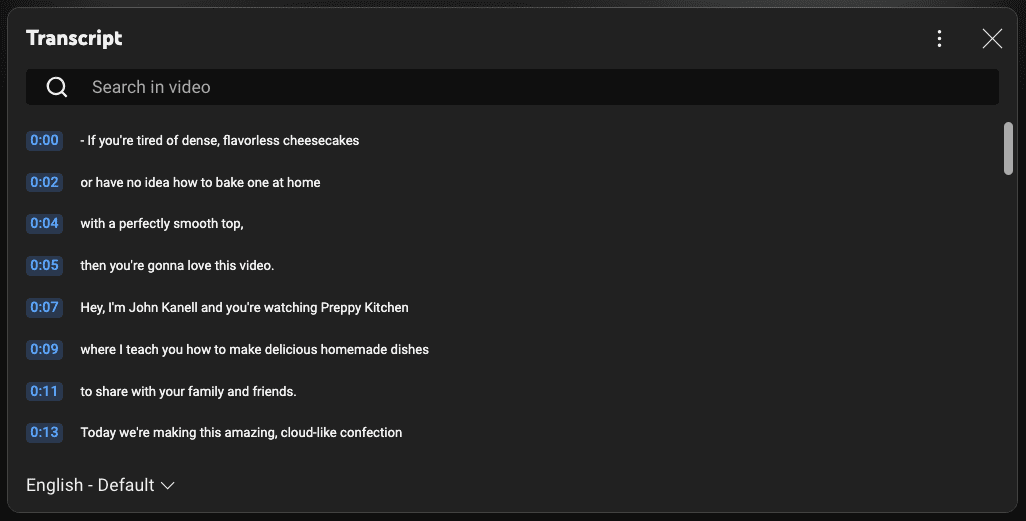
Adding closed captions (CC), subtitles, and transcripts isn’t just about accessibility—it’s a powerful YouTube SEO booster. Here’s why:
✅ Helps YouTube Understand Your Content – The algorithm crawls text to determine relevance.
✅ Improves Watch Time – Non-native speakers or viewers in sound-sensitive environments stay engaged longer.
✅ Rank for More Keywords – Transcripts naturally include synonyms and long-tail phrases.
How to Optimize Them:
-
Upload Manual Captions for accuracy (YouTube’s auto-captions often have errors).
-
Include Target Keywords Naturally in your transcript.
-
Add Subtitles in Multiple Languages to reach a global audience.
Pro Tip: Use tools like Rev.com or Otter.ai to generate accurate transcripts fast.
6. Encourage Viewer Engagement
YouTube’s algorithm prioritizes videos that spark interaction. More engagement = higher rankings.
Proven Tactics to Boost Engagement:
🔥 Ask Questions – “What’s your #1 YouTube struggle? Comment below!”
🔥 Pin a Top Comment – Spark discussions with a pinned question or resource.
🔥 Create Polls (Community Tab) – For eligible channels, use polls to keep fans involved.
🔥 Reply to Comments – Builds community and signals active engagement to YouTube.
🔥 Use CTAs Strategically – “Like if you learned something! Subscribe for more tips.”
Pro Tip: Videos with high engagement in the first 24 hours get a ranking boost—promote new uploads aggressively!
7. Optimize Video File Names
Before you even upload your video, there’s an often-overlooked SEO opportunity—your video file name.
Why It Matters:
-
YouTube can’t “watch” your video—it relies on text clues (like file names) to understand content.
-
A keyword-rich filename helps YouTube categorize and rank your video.
How to Do It Right:
✅ Use Your Target Keyword –
-
❌ “videofinal123.mp4”
-
✅ *”youtube-seo-tips-2024.mp4″*
✅ Separate Words With Hyphens – Easier for algorithms to parse (e.g., *”how-to-rank-youtube-videos.mp4″*).
✅ Keep It Short & Relevant – No spammy repetition.
Pro Tip: Rename files before uploading—editing afterward won’t help SEO.
8. Divide Each Video Into Chapters
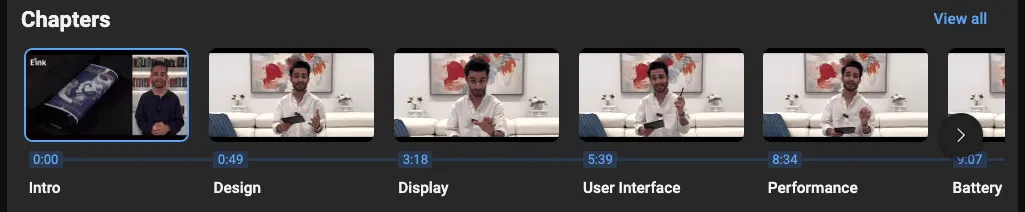
Video chapters (timestamps) boost watch time and SEO by letting viewers skip to key sections—which ironically increases overall retention.
How to Add Chapters:
-
Include timestamps in your description formatted like this:
0:00 - Introduction
1:15 - Keyword Research Tips
3:30 - Optimizing Titles
-
YouTube automatically creates clickable chapters.
SEO Benefits:
-
Rank for “Sub-Searches” (e.g., “how to research YouTube keywords at 1:15”).
-
Reduces Drop-Off Rates – Viewers stay longer when they control navigation.
Pro Tip: Use chapters in how-to, tutorial, or long-form videos for maximum impact.
9. Promote Videos on External Platforms
Relying solely on YouTube’s algorithm is risky. Cross-promotion drives early views and signals popularity.
Where to Share:
-
Social Media: Clip key moments for Instagram Reels, TikTok, or Twitter.
-
Email Lists: Embed videos in newsletters (high-engagement traffic).
-
Forums/Quora: Answer questions with video links (e.g., “Here’s a step-by-step guide: [link]”).
-
Blogs/Website: Embed videos in related blog posts.
Pro Tip:
-
Avoid “Dump-and-Run” Links – Add context (e.g., “I made this video answering your question about YouTube SEO!”).
-
Track Traffic Sources in YouTube Analytics to double down on what works.
Boost Your YouTube Rankings with Expert SEO Strategies
From crafting click-worthy titles to cross-platform promotion, these YouTube SEO tips will help your videos stand out. At Pro Real Tech, we specialize in data-driven YouTube optimization that delivers real growth.
Explore our full suite of digital marketing services:
• Local SEO
• Franchise SEO
• Enterprise SEO
• Video Production
• Media Production
Ready to dominate YouTube search? Let’s discuss how our YouTube SEO expertise can elevate your brand.


