


In today’s competitive digital environment, having a strong content marketing strategy is crucial for businesses of all sizes. However, the sheer volume of tasks required—from content creation and collaboration to distribution and analysis—can quickly become overwhelming. This is where content marketing tools come into play. These tools streamline various aspects of the content marketing process, allowing marketers to create high-quality content, engage with their audiences more effectively, and make data-driven decisions. Whether you’re a small business looking to maximize your efforts or an enterprise seeking to scale your operations, the right set of tools can dramatically improve your efficiency and the impact of your campaigns. In this article, we’ll explore five innovative content marketing tools that can help take your strategy to the next level.
What is a content marketing tool?
A content marketing tool is a software application or platform specifically designed to assist marketers in executing key components of their content marketing strategy. These tools can address a wide array of needs, from planning and brainstorming to content creation, publication, and post-performance analysis. The goal of these tools is to enhance the efficiency, quality, and reach of your content by automating repetitive tasks, improving collaboration, and providing actionable insights based on real-time data.
There are several categories of content marketing tools, each tailored to a specific part of the content process:
- Content Creation Tools: These help generate or design content, such as blog posts, social media graphics, or videos.
- Content Collaboration Tools: These assist teams in working together more efficiently, streamlining approvals, feedback, and editing.
- Content Distribution Tools: These platforms manage the scheduling and publishing of content across various channels, from websites to social media platforms.
- Content Analytics Tools: These track the performance of your content, providing insights into audience engagement, conversion rates, and overall content effectiveness.
The best content marketing tools simplify your workflow by integrating multiple features into a single platform, offering functionalities such as automation, cross-channel management, and in-depth reporting, making it easier to scale your content marketing efforts.
What Should You Look for in Content Marketing Tools?
Choosing the right content marketing tools is essential to improving your workflow, maximizing efficiency, and enhancing the overall effectiveness of your content strategy. With so many options available, it’s important to consider several key factors that align with your specific goals and needs. Here are some crucial aspects to look for when selecting content marketing tools:
- Ease of Use and User-Friendly Interface
The tool should be intuitive and easy to navigate, even for non-technical users. A complicated interface can slow down productivity and make it difficult for your team to adopt the tool. Look for tools that offer a clean design, drag-and-drop functionality, and straightforward navigation. - Integration Capabilities
Your content marketing tool should seamlessly integrate with other platforms you use, such as your content management system (CMS), social media platforms, email marketing software, and analytics tools. Integration helps avoid the hassle of switching between different apps and ensures a more streamlined workflow. - Collaboration and Workflow Management
Collaboration features are critical, especially for teams working on content creation together. Look for tools that enable real-time collaboration, comment sharing, approval workflows, and version control, ensuring that team members can easily communicate and work together on projects without confusion. - Automation Features
Automation is a huge time-saver in content marketing. Whether it’s automating social media posting, sending out newsletters, or triggering content updates, automation features help you schedule tasks and ensure your content reaches your audience consistently without manual effort. - Content Analytics and Reporting
Data-driven decisions are at the core of successful content marketing strategies. Choose tools that offer robust analytics and reporting features, allowing you to track the performance of your content, measure engagement, and optimize your strategy based on data. These insights are vital for understanding what works and what needs improvement. - Scalability
As your business and content marketing needs grow, the tool you choose should be able to scale alongside you. Whether you’re planning to publish more content, expand your team, or target a larger audience, ensure that the tool has flexible features and pricing plans that accommodate growth. - Cost-Effectiveness
While investing in the right tools can significantly improve your content marketing, it’s important to balance the tool’s cost with its benefits. Look for tools that provide a good return on investment (ROI), offering essential features that justify the price, whether you’re working with a small budget or have more resources to allocate. - Customization and Flexibility
Every business has unique content marketing needs. A tool that allows you to customize settings, dashboards, and reports ensures that you can tailor it to your specific workflows and objectives. Flexible tools can be adapted to suit different campaigns, audiences, and content types.
5 Content Marketing Tools You Need To Try
#1. ProofHub (Content Collaboration Tool)
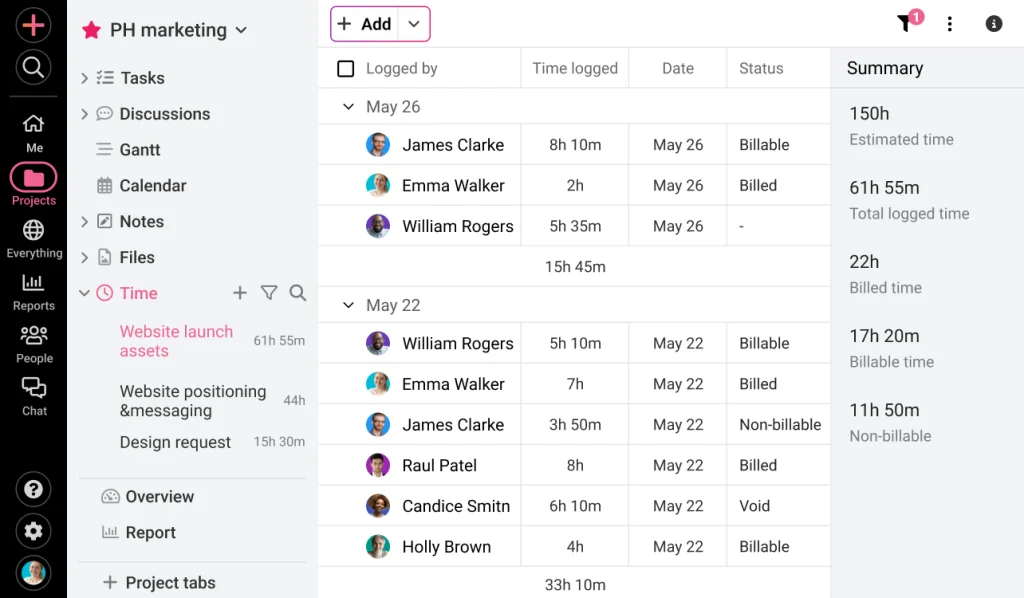
ProofHub is an all-in-one project management and collaboration tool designed to simplify the content creation process for teams. Specifically built to facilitate seamless communication and streamline workflows, ProofHub allows content marketers to organize tasks, share files, and collaborate on projects in real-time. Whether you’re managing content calendars, assigning tasks to different team members, or collecting feedback on drafts, ProofHub ensures that everyone stays on the same page. It’s particularly effective for content marketing teams that need to manage multiple projects simultaneously, offering an intuitive interface that reduces bottlenecks in the approval process and ensures timely delivery of content.
ProofHub provides features such as task delegation, progress tracking, and centralized communication, making it easier for teams to work together without relying on countless email threads or disjointed tools. Its role-based access controls also allow different levels of permission, ensuring that the right people have access to the right content at every stage of the project.
ProofHub Best Features
- Task Management: Organize and prioritize tasks by creating task lists and assigning them to specific team members. You can set deadlines, monitor progress, and receive notifications when tasks are completed.
- Proofing & Feedback: ProofHub offers a built-in proofing tool that allows team members to review, comment on, and approve content in real-time. This eliminates the need for back-and-forth emails and makes it easier to finalize projects quickly.
- Custom Workflows: Teams can create custom workflows to fit their unique content creation processes. You can define stages of approval, assign tasks to different team members, and ensure smooth project progression.
- File Sharing & Storage: ProofHub allows for easy document sharing and storage, meaning team members can access all content assets in one place. It supports multiple file formats, which is great for content teams dealing with images, videos, and text.
- Real-Time Collaboration: ProofHub’s chat and discussion boards make it easy for team members to communicate and resolve issues as they arise, speeding up content creation and decision-making processes.
ProofHub Pros
- Comprehensive Toolset: Combines project management, proofing, file sharing, and collaboration features into a single platform, reducing the need for multiple tools.
- User-Friendly Interface: Simple to use, with minimal training required for teams to get started.
- Time Management Features: Includes Gantt charts and timesheets, allowing you to track the time spent on different tasks and projects.
- Flexible Customization: Teams can create custom workflows and assign specific permissions, ensuring a smooth process tailored to each project.
- Unlimited Users on Premium Plans: ProofHub offers unlimited user access for premium accounts, making it cost-effective for larger teams.
ProofHub Cons
- Limited Automation: While ProofHub excels at manual project management, it lacks robust automation features that could save time on repetitive tasks like scheduling or content publishing.
- Lack of Advanced Integrations: ProofHub doesn’t integrate with as many third-party apps compared to other collaboration tools, which might be a drawback if your team relies on specific software.
- Limited Reporting Features: The reporting tools could be more detailed, especially for teams that need in-depth analytics on project performance or time tracking.
#2. Google Trends (Content Research Tool)

Google Trends is a powerful and free tool from Google that helps content marketers gain valuable insights into current and emerging trends by analyzing the popularity of search queries across different regions and time periods. As a content research tool, Google Trends allows marketers to identify trending topics, understand seasonality, and discover the search interests of their target audience. This is particularly useful for content planning and SEO strategies, as it enables marketers to create relevant and timely content that resonates with audience interests. Whether you’re writing blog posts, creating social media content, or optimizing product pages, Google Trends offers real-time data to guide your content decisions.
Marketers can use Google Trends to compare the popularity of keywords and track how search interest changes over time, allowing them to adjust their strategies accordingly. It’s an essential tool for spotting regional differences in search behavior and can help you uncover niche opportunities that competitors may have overlooked. By understanding what people are searching for, content creators can better align their work with audience demand and boost organic traffic.
Google Trends Best Features
- Trending Searches: Google Trends highlights the most popular searches of the day, offering insights into what topics are currently generating buzz. You can view daily or real-time search trends to keep your content timely.
- Keyword Comparison: The tool allows you to compare up to five keywords or phrases simultaneously, giving you a clear picture of which terms are most popular and how they perform over time.
- Geographic Insights: Google Trends breaks down search data by region, providing a detailed understanding of where interest in specific keywords or topics is highest. This feature is especially valuable for localizing content or targeting specific markets.
- Historical Data: With Google Trends, you can track keyword popularity going back several years, helping you analyze long-term trends and plan content with a view to future growth or seasonal trends.
- Related Queries: Google Trends suggests related search queries, giving you ideas for supplementary or long-tail keywords that could strengthen your content strategy.
- Category and Industry-Specific Trends: You can filter search trends by categories such as sports, business, or entertainment, helping you focus your research on specific industries or niches.
Google Trends Pros
- Completely Free: Google Trends is a free tool, making it accessible to businesses of all sizes, from small startups to large enterprises.
- Real-Time Data: It offers real-time data on search trends, allowing content marketers to quickly react to current events or trending topics.
- No Learning Curve: Google Trends is incredibly easy to use, with a simple and intuitive interface that provides useful insights without the need for technical expertise.
- Global Insights: The ability to break down data by region and language makes it easy to create localized content strategies and target international audiences.
- Improves SEO Strategy: By revealing popular search terms and long-tail keywords, Google Trends helps marketers improve their SEO efforts and create content that aligns with search demand.
Google Trends Cons
- Limited Detail on Search Volume: Google Trends shows relative popularity rather than actual search volume, which may not provide the precise data needed for in-depth keyword analysis.
- No Direct Action Tools: While Google Trends is a valuable research tool, it doesn’t integrate with content management systems or provide features for executing content strategies. You’ll need additional tools for implementation.
- Lacks Granular Data: For highly specific niche markets, Google Trends may not provide enough data, particularly for low-volume search queries or industries with limited online presence.
- Can Be Vague for New Trends: The tool is better suited for analyzing existing trends than identifying new or emerging trends that are just beginning to gain traction.
#3. Canva (Content Design Tool)
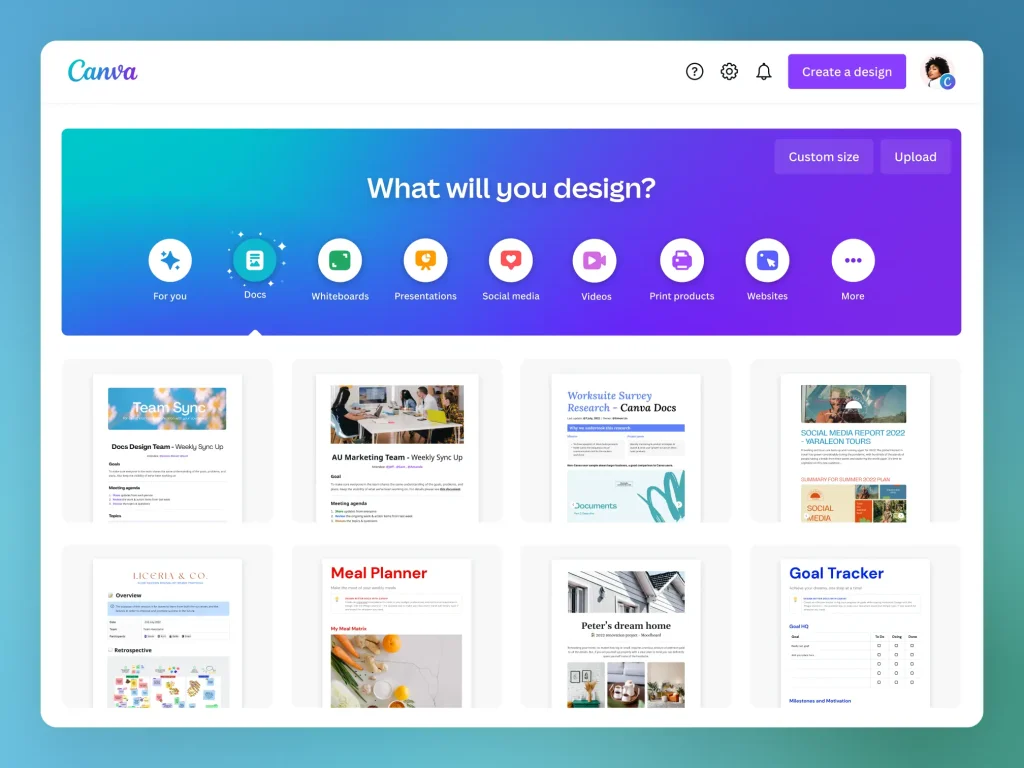
Canva is a widely popular content design tool that empowers marketers, designers, and even non-designers to create visually appealing graphics for social media, blogs, presentations, and more. Known for its ease of use and versatility, Canva allows users to design professional-quality visuals without requiring advanced design skills or expensive software. With a library of customizable templates, fonts, images, and icons, Canva simplifies the process of creating eye-catching content for all types of marketing campaigns.
For content marketers, Canva is especially valuable for producing engaging visuals quickly and efficiently. Whether you’re designing infographics, banners, social media posts, or marketing brochures, Canva provides the tools needed to create branded visuals that resonate with your audience. It’s a cloud-based platform, so users can collaborate in real-time, share projects, and access their designs from any device. Canva’s drag-and-drop functionality makes it easy for anyone to create polished designs, making it an essential tool for content creation.
Canva Best Features
- Template Library: Canva offers thousands of pre-designed templates for a variety of content types, including social media posts, presentations, flyers, and more. Users can easily customize these templates to match their branding and style.
- Drag-and-Drop Editor: Canva’s user-friendly interface allows you to simply drag and drop elements—like text, images, and shapes—into your design, making it incredibly easy to create professional-looking visuals.
- Stock Photos and Elements: Canva comes with an extensive library of free and premium stock photos, icons, illustrations, and other design elements that can be used in your projects.
- Brand Kit: Canva’s brand kit feature enables you to store your brand’s logos, colors, and fonts in one place, ensuring consistency across all your designs.
- Collaboration Tools: Teams can collaborate on designs in real-time by sharing design projects with team members. Canva also allows users to leave comments and suggestions directly on the design.
- Custom Dimensions: Canva allows users to create custom-sized designs, making it easy to tailor content for specific platforms, such as Instagram stories, YouTube thumbnails, or blog headers.
- Download and Export Options: Once a design is complete, users can download their creations in a variety of formats, including PNG, JPG, PDF, and even animated GIFs or videos.
Canva Pros
- Easy to Use: Canva’s intuitive drag-and-drop functionality makes it accessible for users with little to no design experience.
- Versatile Templates: Canva offers an extensive library of templates for various types of content, from social media posts to presentations, which speeds up the design process.
- Collaborative Features: The ability to collaborate on designs in real-time is a huge advantage for teams, allowing for faster feedback and more efficient workflows.
- Affordable: Canva offers a free plan with access to many features, and the paid version (Canva Pro) is affordable compared to traditional design software.
- Accessible Anywhere: As a cloud-based tool, Canva can be accessed from any device, making it convenient for remote teams or users who need to work on-the-go.
Canva Cons
- Limited Design Flexibility: While Canva is great for basic designs, it lacks the advanced features and flexibility of professional design software like Adobe Photoshop or Illustrator, making it less ideal for complex design projects.
- Overuse of Templates: With so many people using Canva’s templates, there’s a risk that your designs could look generic or similar to other brands if you rely heavily on pre-made templates without customization.
- Premium Assets at a Cost: While Canva offers many free elements, some of the best photos, illustrations, and templates are behind a paywall, requiring a subscription or one-time payment for access.
- File Management Limitations: Canva’s file organization system can become cluttered for users working on many projects simultaneously, making it difficult to manage and locate designs.
#4. CoSchedule (Content Distribution Tool)

CoSchedule is a powerful content distribution tool designed to help content marketers plan, organize, and streamline their marketing efforts across various platforms. It offers an all-in-one marketing calendar that enables teams to efficiently schedule and execute their content strategies, ensuring that deadlines are met and content is consistently distributed. CoSchedule is particularly useful for managing social media posts, blog articles, and email campaigns, providing a unified platform to track all content-related tasks.
One of the core strengths of CoSchedule is its ability to automate the distribution of content, which saves time and helps marketers focus on strategy rather than manual scheduling. The platform’s drag-and-drop calendar feature makes it easy to visualize and adjust the timing of campaigns, ensuring that content is distributed at the most effective times. Additionally, CoSchedule integrates with popular platforms like WordPress, Google Analytics, and social media channels, allowing marketers to create, schedule, and measure the performance of their content all in one place.
CoSchedule Best Features
- Marketing Calendar: CoSchedule’s drag-and-drop calendar is its most prominent feature, allowing users to schedule content across multiple channels, visualize timelines, and easily adjust dates to accommodate changes in strategy.
- Social Media Scheduling: With CoSchedule, users can automate the scheduling of social media posts across platforms like Facebook, Twitter, Instagram, and LinkedIn, ensuring content reaches audiences at optimal times.
- ReQueue: This feature allows marketers to automatically recycle top-performing content, helping them maintain a steady flow of content without constantly creating new posts.
- Team Collaboration Tools: CoSchedule provides tools for team collaboration, including task assignments, deadlines, and workflows, allowing marketing teams to work together efficiently and stay organized.
- Integrations: CoSchedule integrates with tools like WordPress, HubSpot, Mailchimp, Google Analytics, and more, making it easy to manage all aspects of content marketing from a single platform.
- Analytics and Reporting: CoSchedule provides detailed insights into the performance of campaigns, helping marketers track engagement, traffic, and other key metrics to refine their strategies.
CoSchedule Pros
- All-in-One Tool: CoSchedule combines multiple marketing functions—content planning, social media scheduling, email marketing, and analytics—into one platform, reducing the need for multiple tools.
- Saves Time: The ability to automate content scheduling and distribution across different platforms saves marketers significant time, allowing them to focus on other important tasks.
- Content Reuse with ReQueue: ReQueue automates the reposting of evergreen content, which helps maximize the lifespan and reach of your best-performing posts without manual rescheduling.
- Seamless Collaboration: CoSchedule’s team collaboration features streamline communication and workflow management, ensuring that all team members are on the same page and tasks are completed efficiently.
- Clear Visualization: The marketing calendar provides a clear, easy-to-understand overview of all ongoing and upcoming marketing campaigns, improving project management and timing.
CoSchedule Cons
- Learning Curve: For new users, CoSchedule’s wide range of features can be overwhelming at first, and it may take time to fully understand and optimize its capabilities.
- Limited Free Features: CoSchedule offers a limited free version, but many of its most valuable features, like ReQueue and advanced analytics, are available only with paid plans.
- Cost for Small Teams: For smaller businesses or teams with limited budgets, CoSchedule’s pricing can be a drawback, especially for advanced features that require higher-tier subscriptions.
- Integration Limitations: While CoSchedule integrates with many tools, some specific platforms or custom workflows may not be fully supported, requiring additional manual effort or third-party tools.
#5. Parse.ly (Content Analytics Tool)
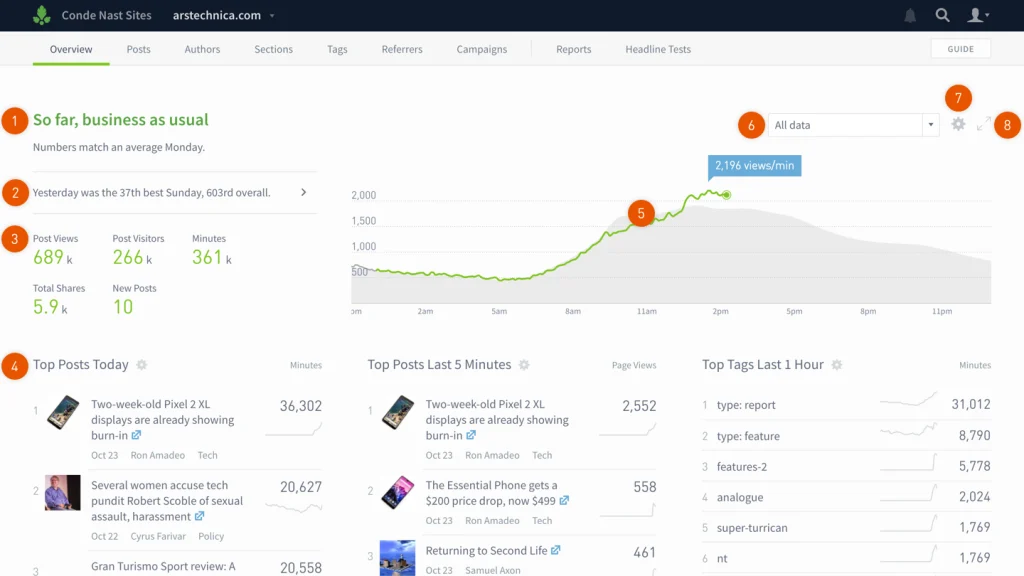
Parse.ly is a comprehensive content analytics tool designed to help content marketers, publishers, and media organizations better understand how their content is performing and how audiences are engaging with it. The platform provides real-time and historical insights into website traffic, audience behavior, and content trends, enabling marketers to refine their strategies for maximum impact. Parse.ly goes beyond basic analytics by focusing specifically on content performance, allowing users to see which articles, blog posts, and videos are driving the most traffic, engagement, and conversions.
With Parse.ly, content creators and marketers can track the effectiveness of their content marketing campaigns, discover what topics resonate with their audience, and identify high-performing content that can be repurposed or amplified. The platform’s intuitive dashboard makes it easy to visualize key metrics like page views, time on site, social shares, and referral sources. By offering data-driven insights, Parse.ly empowers teams to optimize content strategies and make informed decisions that lead to better engagement and ROI.
Parse.ly Best Features
- Real-Time Analytics: Parse.ly provides live data on content performance, showing how readers are interacting with articles and posts in real-time. This allows marketers to make quick adjustments to their content or promotion strategies as needed.
- Audience Insights: The platform delivers in-depth insights into audience behavior, including how readers navigate through a site, which sources refer them, and how long they stay engaged with content.
- Content Performance Dashboard: Parse.ly’s easy-to-use dashboard highlights top-performing content, traffic sources, and engagement metrics. Users can quickly assess which articles are driving the most traffic and engagement.
- Referral Tracking: Parse.ly tracks referral sources, including social media platforms, search engines, and external websites, helping marketers understand where their audience is coming from and how to enhance distribution efforts.
- Historical Data and Trends: Users can access historical data to analyze long-term content performance and identify patterns or trends that can inform future content strategies.
- Custom Reporting: Parse.ly allows users to create custom reports based on specific content metrics, making it easy to share performance updates with teams or clients.
Parse.ly Pros
- Content-Focused Insights: Unlike general analytics tools, Parse.ly is specifically tailored for content marketers, offering in-depth analysis on how content is performing and which topics resonate most with audiences.
- User-Friendly Dashboard: Parse.ly’s dashboard is intuitive and easy to navigate, making it simple for marketers and content creators to access the data they need without needing technical expertise.
- Real-Time Data: The ability to view content performance in real-time helps teams react quickly to trends and optimize their campaigns on the fly.
- Comprehensive Audience Insights: Parse.ly provides valuable audience data, enabling marketers to refine their content strategies based on who their readers are, where they’re coming from, and how they engage with the content.
- Scalable for Large Teams: Parse.ly is designed to support teams of all sizes, making it a valuable tool for organizations that need to monitor large volumes of content across multiple channels.
Parse.ly Cons
- High Cost for Small Businesses: Parse.ly’s pricing can be a drawback for smaller teams or businesses with limited budgets, as it is primarily aimed at larger organizations with extensive content needs.
- Limited Integration Options: While Parse.ly offers some integration capabilities, it doesn’t integrate with as many tools as some other analytics platforms, which may limit its usefulness for teams relying on a wide range of third-party tools.
- Focus on Web Content: Parse.ly is primarily focused on tracking website content performance, meaning it may not provide the same level of insight for other content types, such as emails or podcasts.
- Steeper Learning Curve for Advanced Features: While the basic features of Parse.ly are easy to use, some of the more advanced functionalities may require additional time to master.
Final Thoughts
Utilizing the right content marketing tools can significantly enhance your marketing efforts and drive better results. The tools discussed—ProofHub, Google Trends, Canva, CoSchedule, and Parse.ly—each offer unique features tailored to different aspects of content marketing, from collaboration and design to distribution and analytics. By leveraging these tools, marketers can streamline workflows, create engaging content, and gain valuable insights into audience behavior.
Whether you aim to improve content collaboration, design eye-catching visuals, or analyze performance, these tools can help optimize your strategy and achieve your marketing goals. Embracing these innovative solutions can save time, enhance creativity, and ultimately lead to more effective content that resonates with your target audience. Investing in the right tools empowers you to stay ahead in the ever-evolving world of content marketing.


